Company Intelligence
Look up firmographic detail for a list of company domains and keep it in a shared, org-level library.
User goal
Turn a list of domains into usable company profiles without leaving the product.
- Tier
- Pro and up
- Nav label
- Company Intelligence
- Route
- /company-intelligence
- Gates
- company-enrichment-addon company-enrichment-addon
Prerequisites
- company-enrichment-addon active for the org (Pro and up)
- A list of company domains to submit
- Credits available if the month's included unlocks are already spent
QA focus
- The library is org-level: entitlement is per-org, and reading a profile requires an unlock the org holds — same-tenant is NOT the boundary
- A submission is capped per request (config/company-enrichment-addon.php → per_request_domain_cap)
- Included unlocks are per calendar month and per tier; beyond them each unlock draws credits
- Enrichment is asynchronous — the provider is polled, so the UI must show progress rather than block
- In-flight coalescing is bounded on recency: a stalled run must stop holding its domains, the monthly allowance and the progress row (config company-enrichment-addon.stuck_after_minutes)
Overview
Company Intelligence turns a list of company domains into firmographic profiles in a shared, organization-level library — available from the top-level sidenav, not tied to a single project.
What you get
- Submit domains for enrichment (capped per request so huge pastes are split)
- An org-wide library everyone on the org can browse and reuse
- Per-company unlocks: browse is open with the add-on; reading a profile needs an unlock the org holds
- Monthly included unlocks per tier; further unlocks draw from org credits
How it works
- Submit domains; enrichment runs in the background with visible progress
- Browse the library; locked vs unlocked companies are clearly distinguished
- Opening a profile spends an included unlock first, then credits — reopening an already-unlocked company does not charge again
- Submitting a domain that is already being enriched rides on that run instead of charging twice. If a run stops making progress it releases its domains after 30 minutes by default (configurable), so resubmitting does a real enrichment rather than silently attaching to a run that will never finish
- A run that stalls is resumed automatically by a scheduled reconciler; one that cannot be resumed within the provider's retention window is failed and its reserved credits returned
Common issues & false alarms
- Submission rejected → more domains than the per-request cap; split the list
- Profile visible in the library but not readable → the org has not unlocked that company yet
- Results not appearing immediately → enrichment is asynchronous; the provider is polled and reconciled
- Resubmitting a domain seems to do nothing → it is attaching to an enrichment already in flight for the org (not a second charge). If that run has stalled, its domains are released after 30 minutes by default (configurable) and the next submission enriches for real
- Progress row says the enrichment stopped responding → the run went quiet past the threshold. It stops polling and the domains are released; submit again to retry
Interactive guide
Step of
What to do
Where to find it
Expected (pass)
Negative cases
Tips
Screenshot pending capture
All steps (reference)
-
Step 1. Submit domains to enrich
Paste or upload the company domains you want. A single submission is capped so one huge paste cannot swamp the queue; split a longer list across submissions.
What to do: Company Intelligence → submit a list of domains.
Where: company-intelligence.index
Expected (pass)
- The request is accepted and enrichment starts in the background
- Progress is visible rather than the page blocking
Negative cases (must fail safely)
- More domains than the per-request cap → rejected with the applied cap named
- Org without the addon → upgrade page, not a bare 403
-
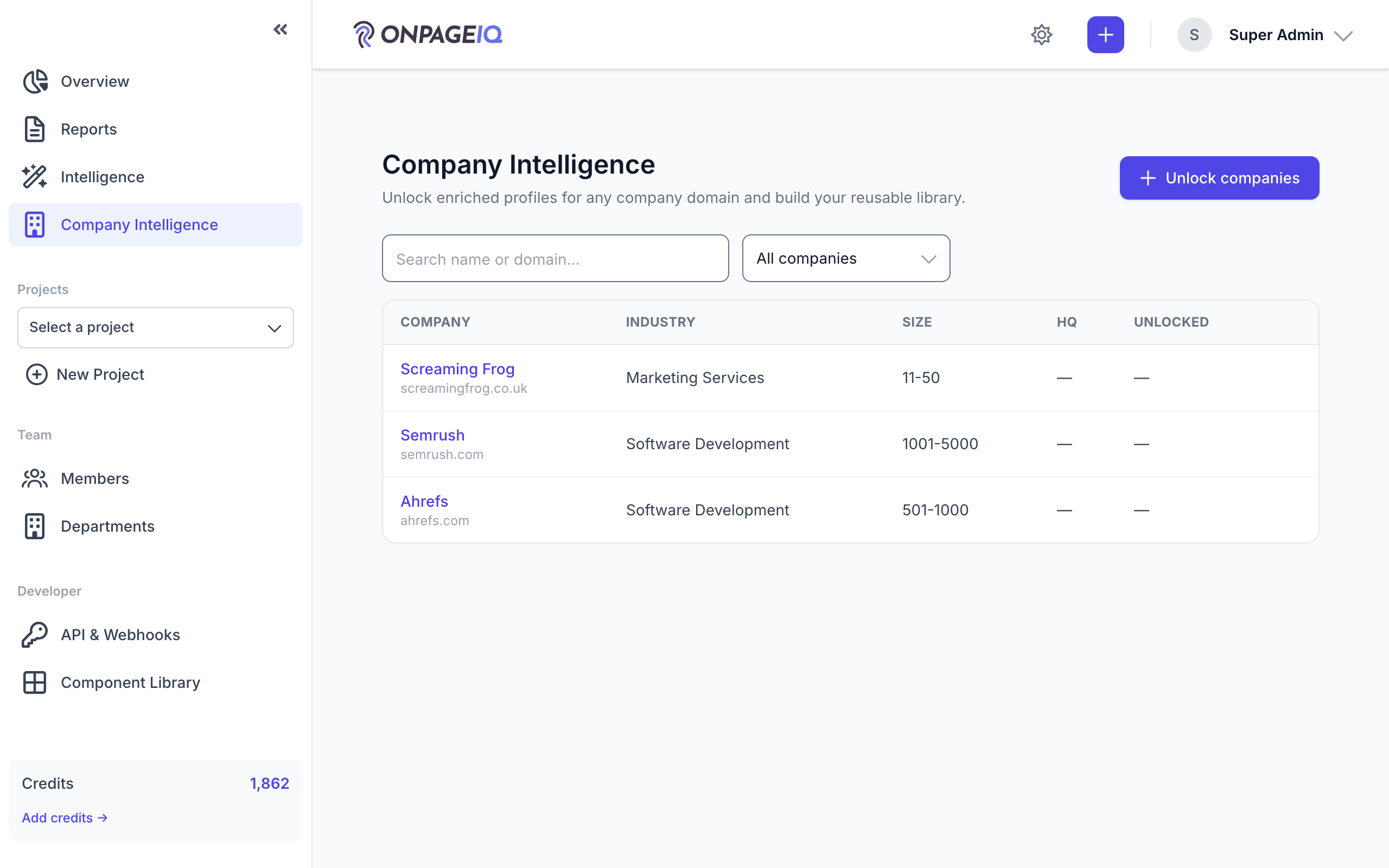
Step 2. Browse the org library
Enriched companies land in a library shared across your organization, so a domain someone else already looked up does not cost a second unlock.
What to do: Company Intelligence → browse and search the library.
Where: company-intelligence.index
Expected (pass)
- Previously enriched companies are listed for the whole org
- Locked and unlocked companies are visibly distinguished
Negative cases (must fail safely)
- Another organization's library is never visible
-
Step 3. Open a company profile
Opening a profile spends an unlock if your org does not already hold one for that company. The month's included allowance is used first; after that each unlock draws credits.
What to do: Open a company from the library.
Where: company-intelligence.show

Expected (pass)
- The firmographic detail renders for an unlocked company
- Re-opening an already-unlocked company does not spend a second unlock
- The remaining monthly allowance is visible before spending
Negative cases (must fail safely)
- Allowance spent and no credits → blocked with a top-up prompt, nothing charged
- A profile id the org holds no unlock for → refused, even though it is the same tenant
-
Step 4. Admin: enable for an org in Filament
SuperAdmins can grant Company Intelligence without a Stripe subscription by flipping the per-org Pennant override. After enabling, the org sidenav shows Company Intelligence. Enriched profiles (including raw provider JSON) are visible under Filament → Intelligence → Company Profiles.
What to do: Filament Admin → Organizations → edit org → Add-ons → enable “Company Intelligence”. Then Filament → Intelligence → Company Profiles to inspect cache rows.
Expected (pass)
- The Add-ons toggle writes a Pennant override for company-enrichment-addon
- Tenant sidenav shows Company Intelligence for that org
- Company Profiles resource lists enriched domains after a successful submit
Negative cases (must fail safely)
- Toggle off → tenant route shows the upgrade page / forbidden for gated routes
- Jobs stuck queued → ensure Horizon watches the company-enrichment queue (supervisor-company-enrichment)
Tips
- Requires BRIGHTDATA_API_TOKEN and a worker/Horizon supervisor on the company-enrichment queue.
Related guides
Billing & Subscriptions
Manage subscription tier, purchase credits, add-ons, and view billing history.
Intelligence Hub
Cross-source insights combining GSC, GA4, scans, and audits.
Market Intelligence
Discover nearby areas with Census demographics, Fit & Opportunity scoring, and a numbered map that matches the table — then send included areas to Keyword Research and AI Visibility.
Local Listings
Match BBB, Yelp, Angi, Trustpilot, and G2 listings to a project (Google Business Profile sync planned), confirm the right business, and surface reputation proofs in Business Profile, Local SEO, and Intelligence.