Listing Alignment
New · Aug 4, 2026 Needs testingConfirm a location’s business identity on Project Settings → Local SEO, then audit name/address/phone/website alignment across website, schema, Google, directories, and Apple/Azure — with honest Not tested when a source is unavailable, plus findings and tasks when sources disagree.
Still to be tested
This guide and the Listing Alignment feature shipped recently and still need QA walkthrough sign-off.
Use the QA focus checklist below; remove the needs_testing flag in
config/platform-docs/pages/addons.php after the team signs off.
User goal
Confirm the canonical NAP for a location on Local SEO settings, raise source coverage with honest statuses, and remediate Fix now / Fix soon findings — without ranking guarantees or vanity citation scores.
- Tier
- Pro and up (Local listings) + Pennant listing-alignment
- Nav label
- Alignment
- Route
- /projects/{project}/local-listings/alignment
- Gates
- listing-alignment directory-listings-addon
Prerequisites
- directory-listings-addon active for the org (Pro and up)
- Pennant listing-alignment activated for the org (default off — Filament org Viewer → Feature Flags, or ops grant)
- Owner/Admin confirms NAP on Project Settings → Local SEO (Listing Alignment identity); Members+ can run audits
- Local SEO tab: GeoGrid entitlement + manage_geogrid, or Alignment-only Owner/Admin when GeoGrid is off
- Ready site architecture crawl for Website / Schema NAP (otherwise those rows stay Not tested)
- Optional: confirm the Google listing on the hub (Local SEO match or paste a Google Maps link) when Places search is ambiguous
- Optional: link GBP / Yelp / BBB on the Listings tab, or paste public URLs under Confirm listing URLs
- Optional: AZURE_MAPS_SUBSCRIPTION_KEY + Filament acquisition gate Proven for live Azure POI
- GCP_API_KEY (or GOOGLE_ADDRESS_VALIDATION_API_KEY) for Places / Address Validation when those paths run
QA focus
- Profiles, runs, findings, and tasks are org+project scoped; never accept organization_id from the client
- Confirm UX is Project Settings → Local SEO (not a standalone profile editor); hub Confirm/Edit (primary) deep-links there
- Owner/Admin Save confirms primary local_business_profiles; Manager Save updates GeoGrid only
- Viewers can open Hub / runs / findings / tasks but cannot confirm profile, map sources, run audits, or mark resolved
- Website/Schema Not tested with no_ready_site_crawl until a Ready site architecture has homepage HTML
- Places Not tested when GCP key missing; No result / awaiting_picker until listing confirmed — not Provider failure
- GBP Not tested / No result until Directory GBP link (or OAuth + mapped location) — deep-link to Listings
- Apple and Azure stay not_tested until acquisition_gate allows URL/CSV or Proven API
- At most five additional industry/manual mappings count toward the five-slot cap (Angi/Trustpilot/G2 linked set does not)
- Linking a listing after a run shows the stale-audit notice; a run newer than every link does not (org-scoped — another org’s link must not trigger it)
- Yelp/BBB rows that are not settled offer a Listings next step; the column is no longer GBP-only
- Core and Full audits reserve quota per mode; overlapping queued/running runs are blocked
- After a run, open findings create tasks; Mark resolved closes the finding and its open task
- Aggregator only runs when Filament/runtime aggregator_enabled is on (default off)
Overview
Listing Alignment compares a user-confirmed business identity (name, phone, website, address or service-area status) against website/schema NAP, Google (GBP + Places), Local listings directories (Yelp/BBB and Full-mode Angi/Trustpilot/G2), plus Apple Business / Maps and Azure Maps under explicit acquisition gates.
What you get
- Listings | Alignment tabs on Local listings when the Pennant flag is on
- Confirmed
local_business_profilesthat never auto-overwrite confirmed fields - Profile confirm on Project Settings → Local SEO (Places pin + NAP on one Save; prefills from Places details, linked GBP, or AI Business Profile)
- Core and Full audits from a single Run audit slide-over (shows remaining monthly quota + 1-unit cost)
- Sources table with status, listing URL, and next-step deep-links (e.g. GBP → Listings)
- Confirm Google listing (Local SEO name/address card, paste a Google Maps link, or pick a candidate — Place IDs stay out of the UI)
- Confirm listing URLs for Yelp/BBB/Apple/Azure/industry (up to five capped industry slots)
- A notice when a listing was linked or re-mapped after the last audit, so a stale Not tested is explained rather than mysterious
- Coverage % = applicable sources tested (not a 0–100 “health score”)
- Findings + tasks after each audit — Fix now / Fix soon drive hub Health; run / finding / tasks routes
- Honest Not tested when Apple/Microsoft lack access, crawl HTML is missing, or a directory is unlinked
How it works
- Owner/Admin opens Settings → Local SEO, fills or accepts Places autofill, and Saves to confirm the primary identity
- Run a site architecture crawl so Website / Schema can read homepage NAP
- Optionally confirm Places, link GBP on Listings, map manual listing URLs, or import CSV
- Open Run audit, choose Core or Full (remaining quota and 1-unit cost are shown), and start — the page updates while the job runs, then shows coverage, next steps, and findings
- Open View findings / Tasks to remediate; Mark resolved closes the finding and task
- Ops set Apple/Azure gates, quotas, freshness, and the aggregator kill-switch in Filament
Core vs Full
| Core | Full | |
|---|---|---|
| Sources | Website, schema, GBP, Places, Yelp, BBB, Apple, Azure | Core + Angi, Trustpilot, G2 + up to five industry directories |
| When to use | Day-to-day NAP coverage after Local SEO confirm | Deeper directory sweep when Core is not enough |
| Cost | 1 Core quota unit per run | 1 Full quota unit per run |
| Monthly defaults | Pro 10 / Team 30 / Enterprise 100 | Pro 2 / Team 8 / Enterprise 30 |
Honesty rules
- No ranking guarantees from fixing mismatches
- Apple remains URL/CSV or Not tested until partner API is proven
- Azure Maps POI calls only when Filament gate is Proven and a subscription key is configured
- Missing
GCP_API_KEY→ Places Not tested (not Provider failure)
Common issues & false alarms
- Alignment tab missing → activate Pennant listing-alignment for the org (Filament → Organization → Feature Flags, and ensure Local listings entitlement)
- 404 on Alignment routes → flag off or wrong org
- Cannot confirm profile → need Owner/Admin on Settings → Local SEO with Directory + Pennant; Viewers are blocked
- Manager saved Local SEO but Hub still says incomplete → only Owner/Admin confirm Alignment NAP
- Cannot run audit → profile not confirmed, Viewer role, overlapping run, or quota exhausted
- Website/Schema always Not tested → run a site architecture crawl until Ready with homepage HTML
- Places No result / awaiting picker → Confirm Google listing on the hub (Use this Google listing from Local SEO name/address, or paste a Maps URL), then re-run
- Places Not tested · gcp_api_key_missing → ops must set GCP_API_KEY (IP-restricted) on the environment
- Places Provider failure · places_api_forbidden → Google refused the key. In Google Cloud check that Places API (New) is enabled for the project AND that the key’s API restrictions allow it — re-running will not help until then
- A directory you just linked still says Not tested → the audit ran before the link finished saving. The page shows a “your listings changed since the last audit” notice; re-run the audit
- GBP Not tested / No result → Connect or link Google Business Profile on the Listings tab (use the Sources next-step link)
- Yelp/BBB Not tested → paste the public profile URL under Confirm listing URLs, or link from Listings, then re-run
- Apple/Azure always Not tested → expected until URL mapped or Filament gate Proven (Azure) / partner signup (Apple)
- Sixth industry directory rejected → five-slot cap; exclude or remove an existing capped mapping
Interactive guide
Step of
What to do
Where to find it
Expected (pass)
Negative cases
Tips
Screenshot pending capture
All steps (reference)
-
Step 1. Open Alignment under Local listings
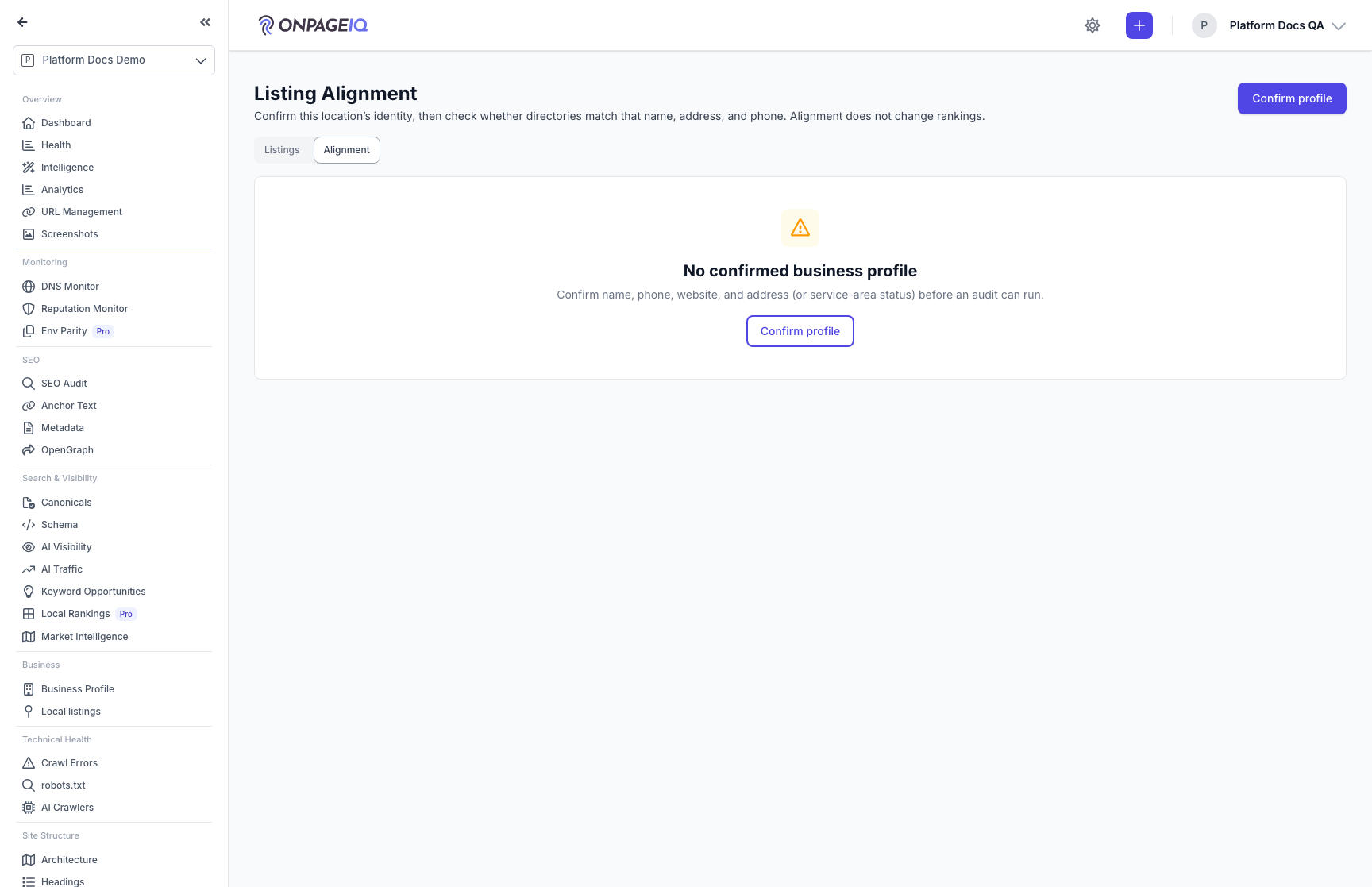
From a project, open Business → Local listings, then the Alignment tab (or go directly to the Alignment hub). Without the Pennant flag the tab and routes are unavailable (404). Use **Confirm profile** to jump to Local SEO when no identity exists yet.
What to do: Project sidenav → Business → Local listings → Alignment
Where: local-listings.alignment.index
Expected (pass)
- Page title Listing Alignment
- Listings | Alignment tabs visible
- Empty state prompts confirming a business profile; Confirm profile links to Settings → Local SEO
Negative cases (must fail safely)
- Pennant off → 404
- Local listings addon off → 403
- Cross-org project → 403/404
-
Step 2. Confirm the canonical business profile on Local SEO
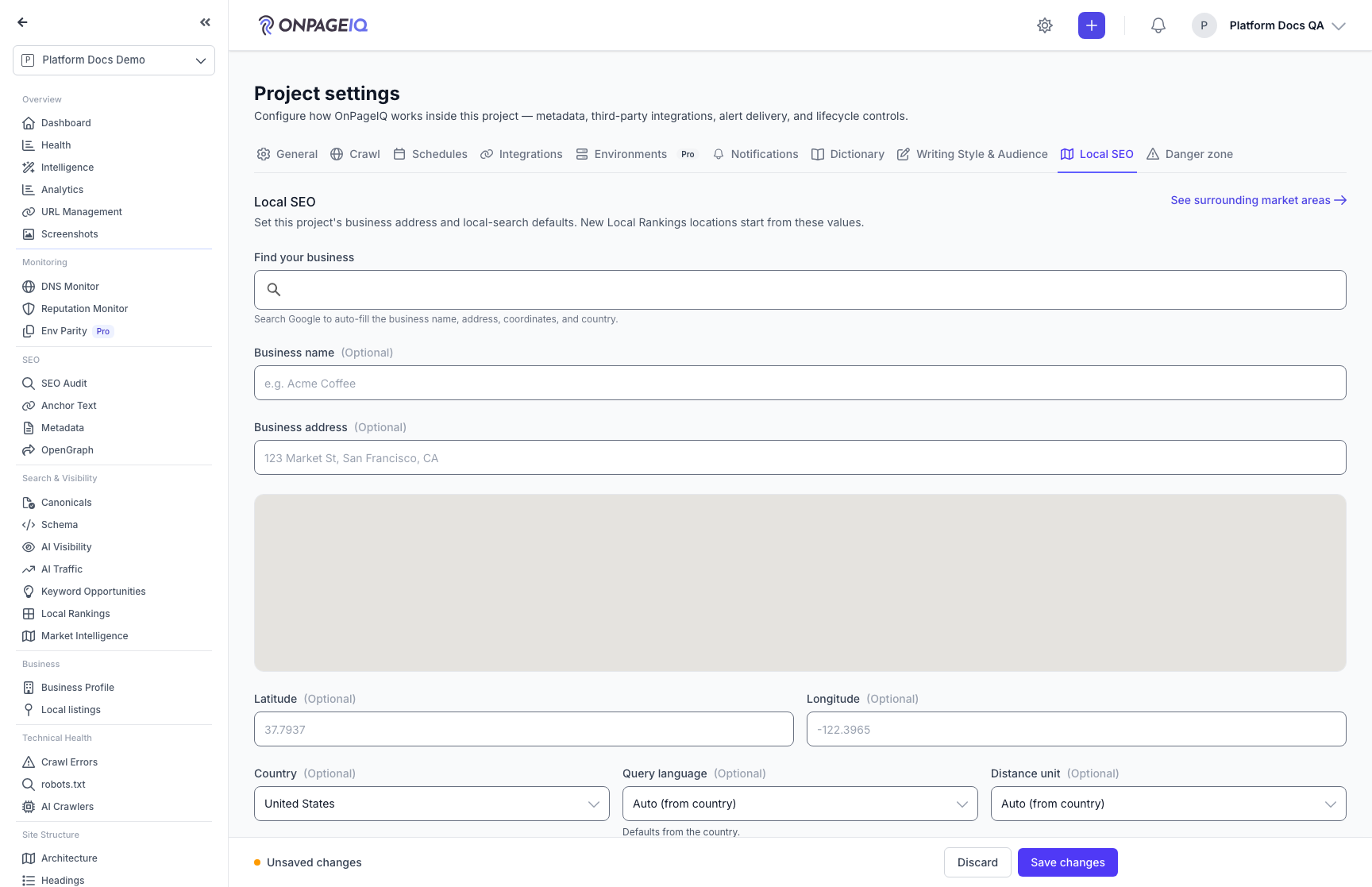
Owner or Admin confirms public name, phone (E.164), website, country, and street address or service-area business on **Project Settings → Local SEO** (Listing Alignment identity section). Places search autofills phone/website/structured address when available. Prefill may also come from a linked Directory GBP or AI Business Profile. Confirmed fields are never auto-overwritten by crawls or AI refresh. Managers can save Local SEO defaults but only Owner/Admin confirm Alignment. Multi-location edit is deferred — hub Edit appears for the primary profile only.
What to do: Settings → Local SEO (or hub Confirm profile) → fill NAP → Save
Where: projects.settings
Expected (pass)
- Local SEO tab shows Listing Alignment identity fields when Pennant listing-alignment is on
- Form validates website as a safe public URL
- After Save, Hub shows the primary profile as Confirmed
Negative cases (must fail safely)
- Viewer → cannot open confirm redirect / cannot save Alignment
- Manager → Local SEO saves without confirming Alignment
- Missing required NAP fields → validation errors (Owner/Admin)
Tips
- Alignment-only orgs (no Local Rankings / GeoGrid) still get Local SEO for Owner/Admin so confirm is not stranded.
- Legacy /alignment/profile/create bookmarks redirect here with a toast.
-
Step 3. Raise source coverage (crawl, Places, GBP, URLs)
Before expecting high coverage: run a site architecture crawl for Website/Schema; confirm the Google listing when search is ambiguous (prefer **Use this Google listing** showing the Local SEO name and address — not a Place ID); connect or link GBP on the Listings tab; paste Yelp/BBB (and optional industry) URLs under Confirm listing URLs. The Sources table shows status and a next-step link for GBP when needed.
What to do: Crawl site → Confirm Google listing / link Listings / paste URLs as needed
Where: local-listings.alignment.index
Expected (pass)
- Confirm Google listing section when entitled to map sources
- Sources table lists core directories with status badges
- GBP next step links to Local listings when not connected or unmapped
Negative cases (must fail safely)
- No crawl → Website/Schema Not tested with guidance to run a site scan
- Viewer → cannot confirm Places or save listing URLs
Tips
- When Local SEO already has a Google pin, confirm with “Use this Google listing” (name and address shown — no Place IDs).
- Otherwise paste a Google Maps link for the business; candidates from an ambiguous search also appear after a Core run.
-
Step 4. Run a Core or Full audit and read coverage
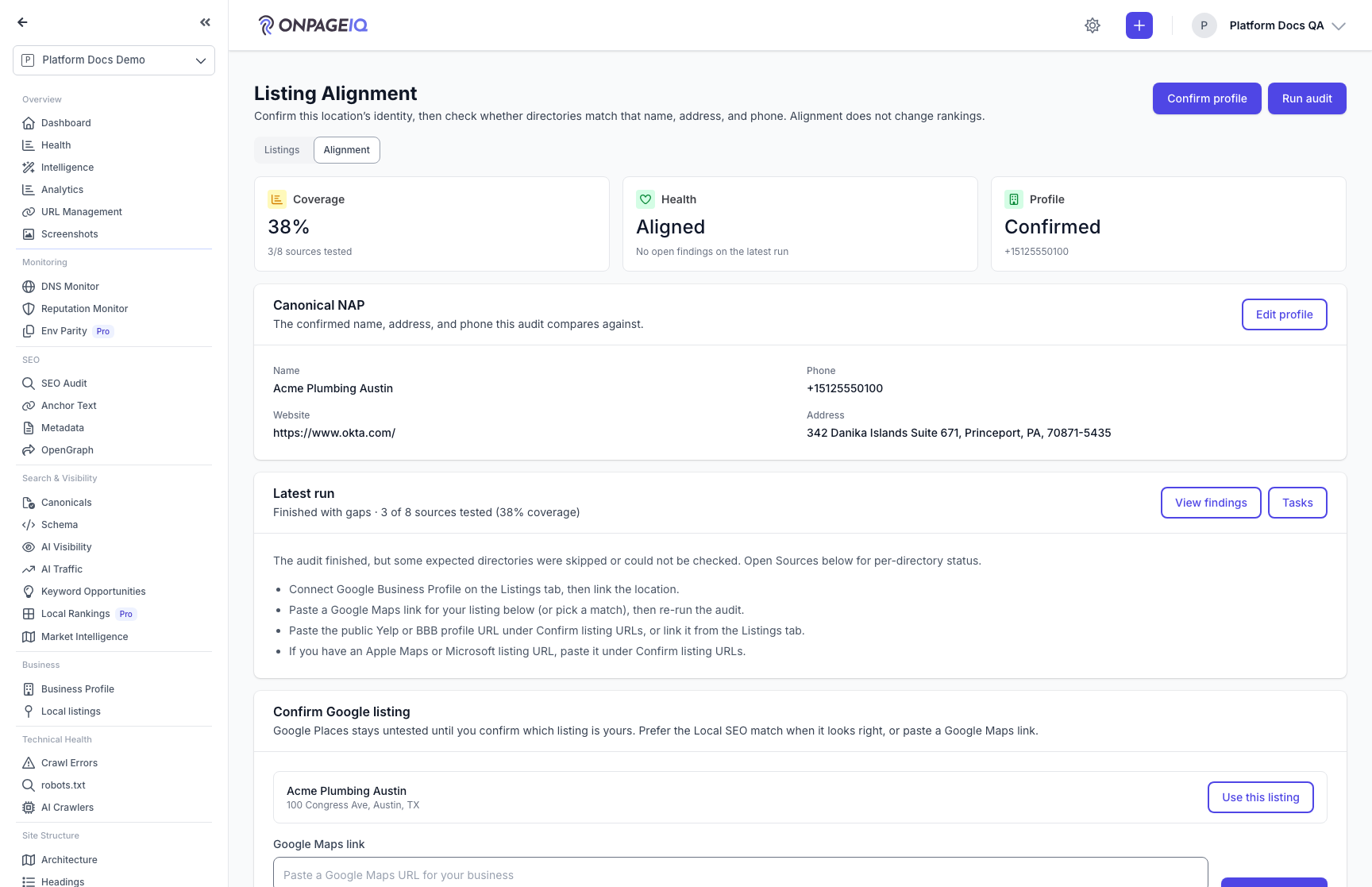
Members+ with run permission open **Run audit**, choose Core or Full in the slide-over (remaining monthly quota and 1-unit cost are shown), then start. The hub updates while the job runs. Coverage is tested/applicable sources — not a composite score. Health reflects open Fix now / Fix soon findings when present. Apple/Azure may show Not tested when gates forbid live checks.
What to do: On a confirmed profile → Run audit → pick Core or Full → Start → wait for the hub to refresh after the job completes
Where: local-listings.alignment.index
Expected (pass)
- Run audit opens the mode slide-over with remaining Core/Full quota
- Latest run status, coverage explanation, and next steps after completion
- View findings and Tasks actions when a run exists
- Flash message if profile unconfirmed, overlapping run, or quota exhausted
Negative cases (must fail safely)
- Unconfirmed profile → blocked with message
- Second concurrent run → overlapping-run error
- Core/Full quota exhausted → Start disabled / quota exception message
Tips
- Full adds Angi/Trustpilot/G2 and up to five capped industry/CSV mappings on top of Core.
- Quota defaults: Pro 10 Core / 2 Full per month (Filament overrides).
-
Step 5. Re-run after linking a listing
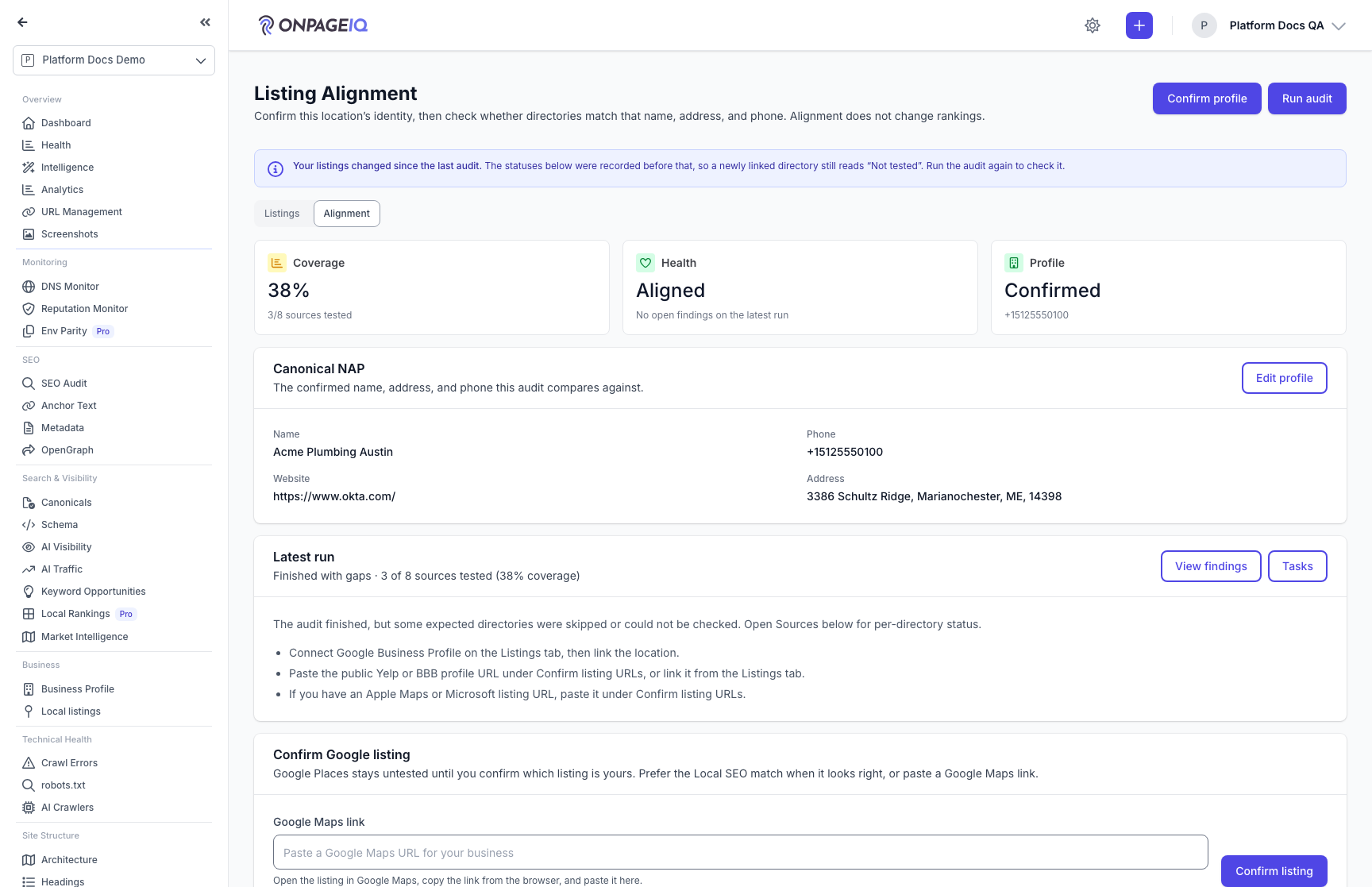
Linking a directory and checking it are separate steps, and the check can finish seconds before the link finishes saving — so a directory you just linked can still read **Not tested**. When a listing is linked or re-mapped after the most recent audit, the hub says so and points you at running it again. The row keeps the URL you entered either way, including when a lookup ended without success, so there is always something to see and act on.
What to do: Link a listing on Listings → return to Alignment → read the notice → Run audit again
Where: local-listings.alignment.index
Expected (pass)
- Notice: your listings changed since the last audit
- Directory row still shows the requested listing URL
- Yelp / BBB rows that are not settled link to the Listings tab
Negative cases (must fail safely)
- Audit newer than every link → no notice
- Another org linked a listing → no notice on this project
Tips
- The notice is about freshness, not failure — the statuses below it were simply recorded before your change.
-
Step 6. Review findings and close tasks
Open View findings for the latest run, inspect field mismatches, and Mark resolved when the directory is fixed (or acknowledge). Tasks list open remediation work created automatically for Fix now / Fix soon findings.
What to do: Latest run → View findings → open a finding → Mark resolved (or open Tasks)
Where: local-listings.alignment.tasks.index
Expected (pass)
- Run detail lists findings ordered by priority
- Finding detail shows field, source, priority, and recommended action
- Mark resolved closes the finding and its open task for Members+
Negative cases (must fail safely)
- Viewer → can read findings/tasks but cannot Mark resolved
- Cross-org finding/run URL → 404
-
Step 7. Admin: quotas, gates, and aggregator kill-switch
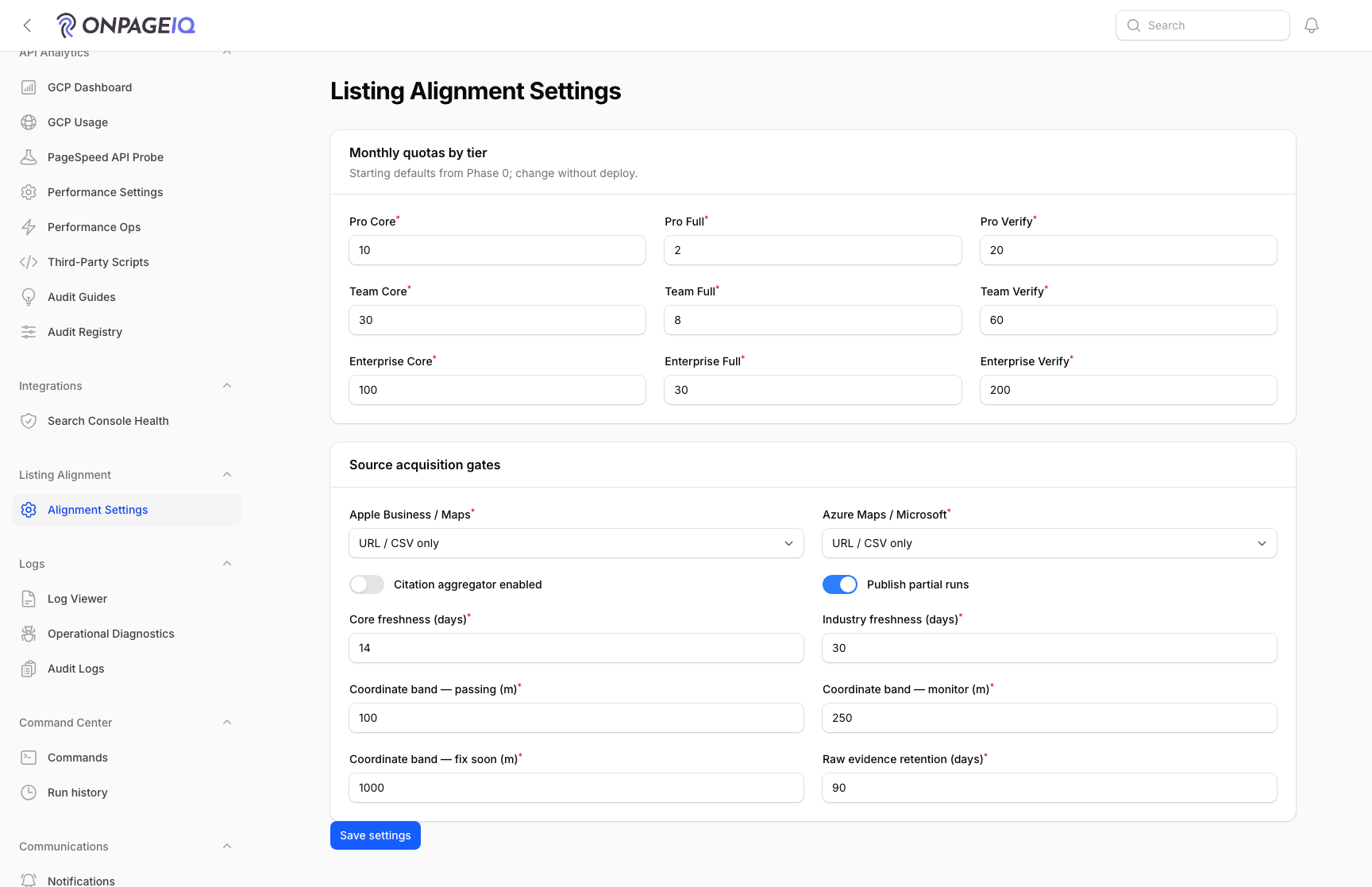
Support/SuperAdmin open Filament → Listing Alignment → Alignment Settings to adjust per-tier quotas, Apple/Azure acquisition gates, aggregator enablement, freshness windows, coordinate bands, and evidence retention.
What to do: Filament → Listing Alignment → Alignment Settings → Save
Expected (pass)
- Apple/Azure gate selects: Not tested / URL·CSV only / Proven
- Citation aggregator toggle defaults off
- Save shows success notification
Negative cases (must fail safely)
- Non-ops role → page inaccessible
Tips
- Set Azure gate to Proven only after AZURE_MAPS_SUBSCRIPTION_KEY is configured and POI calls are approved.
- Leave aggregator off until a vendor endpoint is contracted.
Related guides
Local Listings
Match BBB, Yelp, Angi, Trustpilot, and G2 listings to a project (Google Business Profile sync planned), confirm the right business, and surface reputation proofs in Business Profile, Local SEO, and Intelligence.
AI Business Profile & Keyword Assist
Let AI infer your market, audience, competitors, and priority keywords from your crawl — then reuse it in Keyword Research and AI Visibility (LLM Listening).
Local Rankings (GeoGrid)
Track Google local-pack rankings across a geographic grid, with a square or radial (concentric-ring) layout, a rank heatmap, and PDF reports.
Billing & Subscriptions
Manage subscription tier, purchase credits, add-ons, and view billing history.
Site Architecture
Visual crawl tree, click-depth analysis, orphan detection, and architecture export — plus the definitions behind every number on the Statistics panel.