Location Intelligence Reports
Turn any discovered area into a sourced, per-area report — demographics, income, housing, growth, and hazard data with provenance — plus a grounded AI narrative and one-click localized SEO targets.
User goal
Understand a single target area in depth from public data, get a business-tailored AI read on it, and push its localized keywords/prompts straight into your SEO tools.
- Tier
- Any plan (billed in credits per AI report); the sourced data sections are free; free re-use when the area data is unchanged
- Nav label
- Report
- Route
- /projects/{project}/market-intelligence/areas/{area}/report
- Gates
- —
Prerequisites
- A completed Market Intelligence discovery run with at least one area (drill in from the areas table)
- A ready Business Profile (the AI narrative is grounded on your business context)
- Credits available for the AI narrative (the sourced data sections are always free; unchanged area data re-uses the prior AI report for free)
- For the per-area "send to" actions: the Keyword Research and/or AI Visibility (LLM Listening) add-on active
QA focus
- The AI report charges one fixed total on success only; unchanged area data (same input hash) re-uses for free
- The area is always re-resolved scoped to (org, project) — a cross-tenant/cross-project area id is 404/403, never readable or chargeable
- The AI narrative cites only the sourced figures on the page — no invented numbers; county-level figures are labeled "County context", never shown as the place headline
- Per-area "send to" actions authorize edit_project and re-check the relevant add-on entitlement server-side (same-tenant ≠ entitled)
Overview
A Location Intelligence Report is a per-area deep dive built on Market Intelligence data.
Sourced data (free)
Population, income, housing, education, employment, growth, and hazard risk are assembled on demand. Each datapoint shows its source and vintage. County-level figures are labeled County context so they are never read as the place’s own headline. A confidence badge reflects how complete and authoritative the data is.
AI narrative (credits)
A cost-confirmed AI step generates a grounded narrative — executive summary, audience personas, opportunities, and recommended local-SEO actions — that cites only the numbers on the page.
Use this area for SEO
One click pushes the area’s localized keywords into Keyword Research and localized prompts into AI Visibility (when those add-ons are active).
Common issues & false alarms
- No ready Business Profile → the AI generate step is blocked with a prompt to complete the profile first (no charge)
- No resolved market data for the area yet → the sourced sections show an empty state; run/refresh market discovery
- "Use this area for SEO" panel hidden → neither the Keyword Research nor the AI Visibility add-on is active for the org
Interactive guide
Step of
What to do
Where to find it
Expected (pass)
Negative cases
Tips
Screenshot pending capture
All steps (reference)
-
Step 1. Open an area report
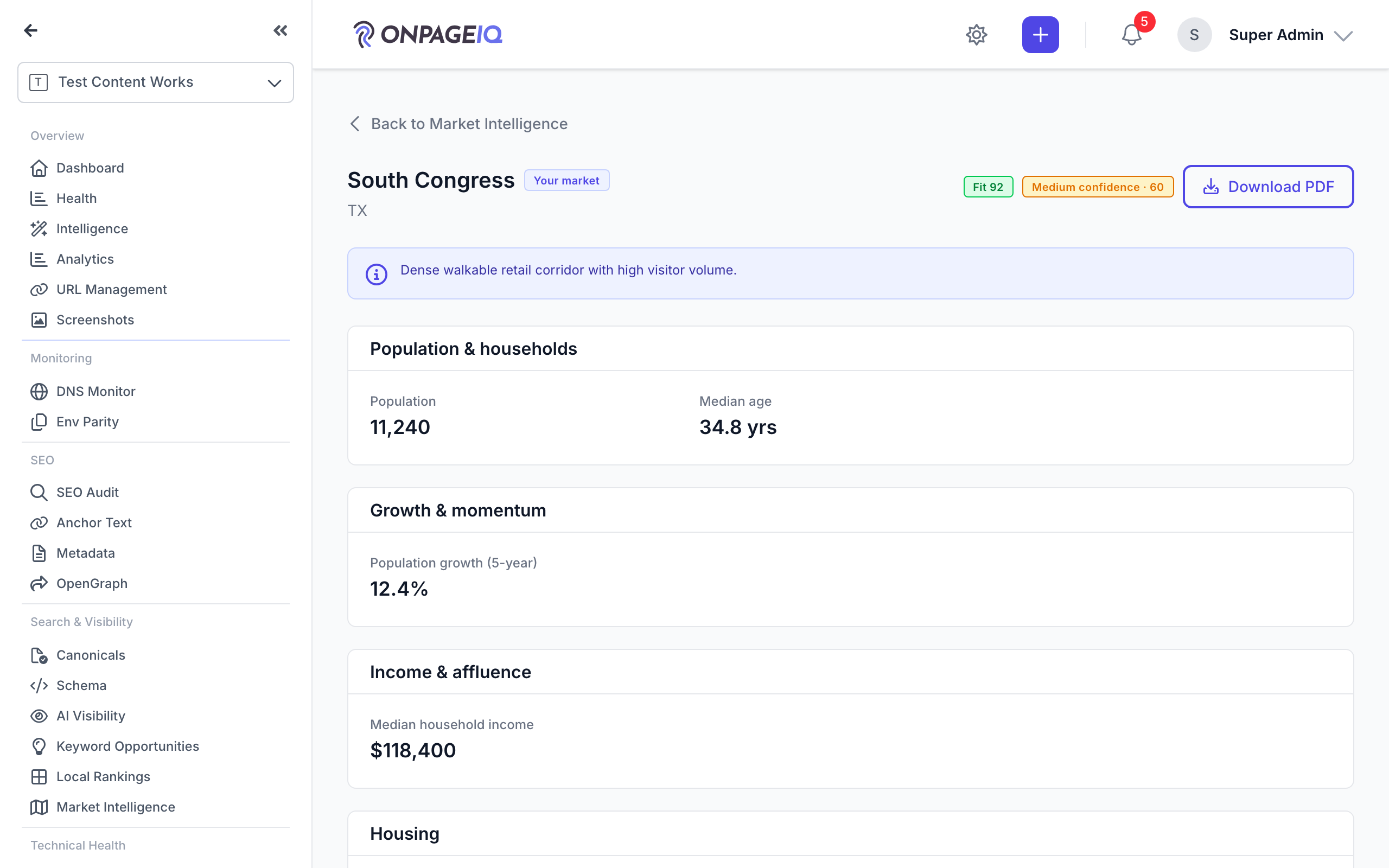
From the Market Intelligence areas table, drill into an area and open its report. The sourced data sections load immediately and for free — each figure shows its source and vintage, and county-level figures are labeled "County context".
What to do: GET /projects/{project}/market-intelligence → open an area → Report
Where: projects.market-intelligence.report
Expected (pass)
- Data sections render with per-datapoint source + vintage
- A confidence badge is shown
- County figures are tagged "County context"
Negative cases (must fail safely)
- Foreign/cross-project area id → 403/404
- No resolved market data → empty state, no charge
-
Step 2. Generate the AI narrative
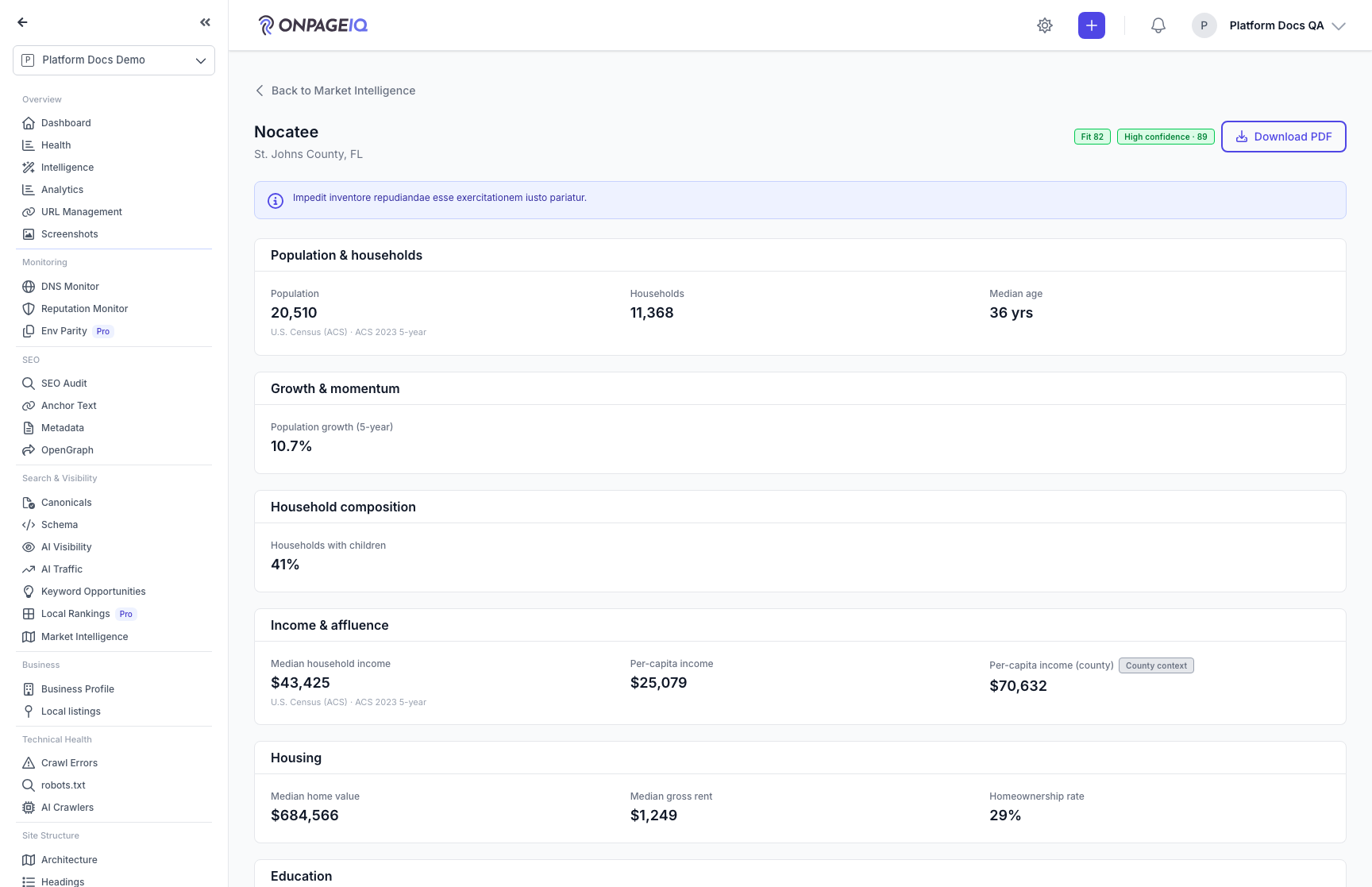
Generate a business-tailored narrative from the sourced data. A modal shows the fixed credit cost (or "Free" when the area data is unchanged) and your balance before you confirm. The narrative is grounded — it cites only the figures on the page — and is clearly labeled "AI-generated".
What to do: Generate AI insights → confirm cost
Where: projects.market-intelligence.report
Expected (pass)
- Cost-confirm modal shows a fixed total (or Free re-use) + balance
- Report goes to "running" then shows the narrative
- Summary, personas, opportunities, and actions cite only sourced numbers
Negative cases (must fail safely)
- No ready Business Profile → blocked with a prompt (no charge)
- Insufficient credits → blocked with a top-up prompt
- Viewer without edit_project → generate is hidden and forbidden
-
Step 3. Use this area for SEO
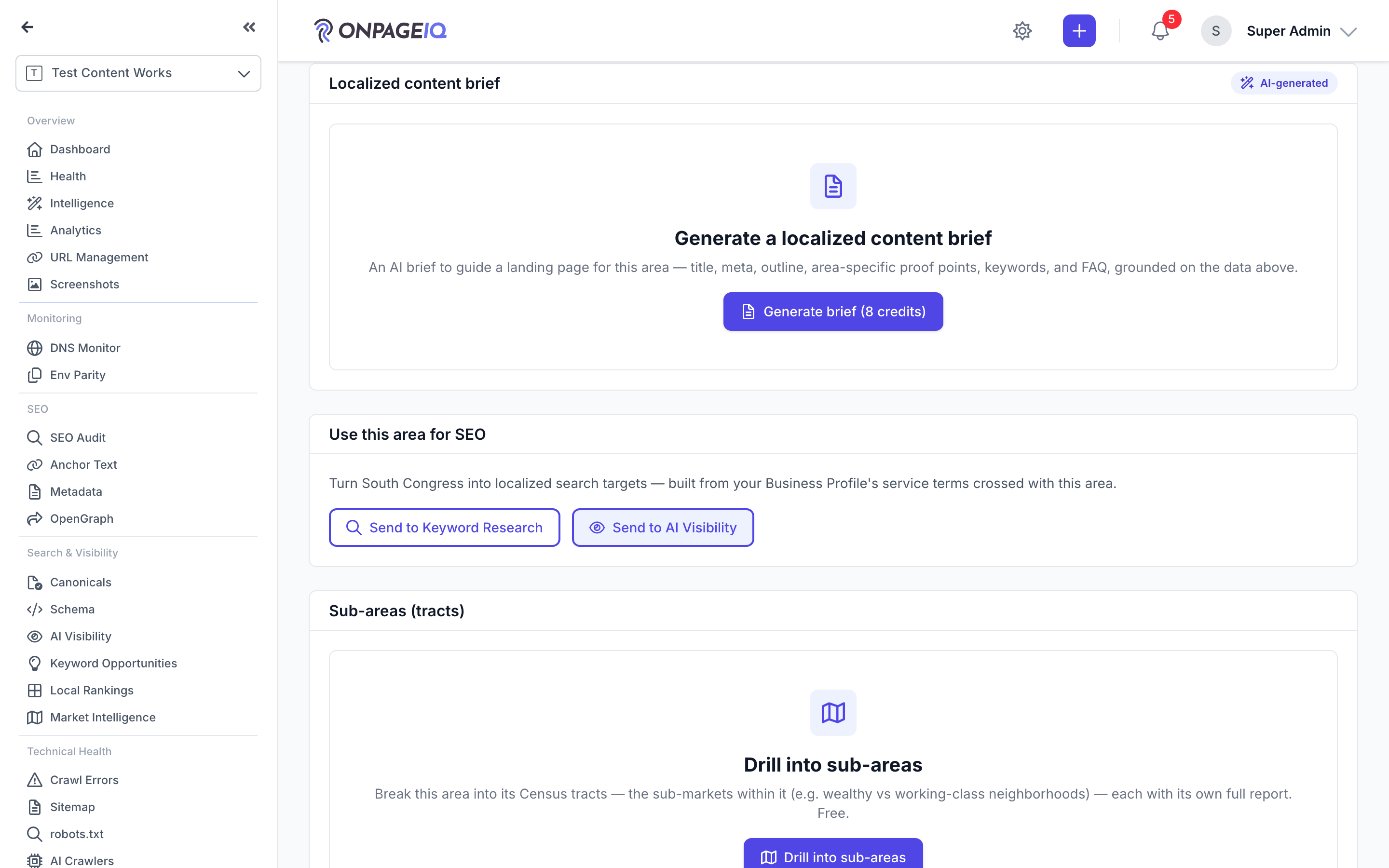
Push this area's localized keywords into Keyword Research and localized prompts into AI Visibility with one click. The targets are built from your Business Profile's service terms crossed with the area; the write respects your tier cap, keyword-set lock, and de-duplicates against existing items.
What to do: Use this area for SEO → Send to Keyword Research / Send to AI Visibility
Where: projects.market-intelligence.report
Expected (pass)
- Localized keywords/prompts added respecting tier cap + dedup + set lock
- Add-on entitlement re-checked server-side
- Keyword Research never auto-creates a run (no surprise charge); AI Visibility prompts are free
Negative cases (must fail safely)
- Relevant add-on inactive → the control is hidden/blocked
- No Keyword Research run yet → nudged to start one, nothing written
- Viewer without edit_project → the send is forbidden
Related guides
Market Intelligence
Discover nearby areas with Census demographics, Fit & Opportunity scoring, and a numbered map that matches the table — then send included areas to Keyword Research and AI Visibility.
AI Business Profile & Keyword Assist
Let AI infer your market, audience, competitors, and priority keywords from your crawl — then reuse it in Keyword Research and AI Visibility (LLM Listening).
Keyword Research Add-on
Discover keyword opportunities from GSC data and AI analysis on project SEO surfaces.
AI Visibility (LLM Listening)
See how the answer engines describe your brand — overall, per engine, and per place you serve — with the evidence behind every number.