Security Monitoring
Turns the one-shot security audit into continuous monitoring — score history, regression alerts, and scheduled re-audits.
User goal
Know when a site's security posture gets worse, without remembering to re-run the audit.
- Tier
- Pro and up (or Stripe add-on)
- Nav label
- Security
- Route
- /projects/{project}/security
- Gates
- security-monitoring-addon security-monitoring-addon
Prerequisites
- security-monitoring active for the org (Pro and up, or the Stripe add-on)
- At least one completed security audit on the project to serve as the baseline
QA focus
- Without the addon the Security page still works — the score-history panel is what is gated, and it links to the upsell rather than 403ing
- A regression alert fires once per audit and only on the downward transition, so a persistently low score does not re-nag
- Cadence, drop threshold, history depth and retention all come from config/security-monitoring.php — history_points, regression.min_score_drop, scan_interval_days, retention_days — no hardcoded interval in code or copy
Overview
Security Monitoring turns the one-shot security audit into continuous monitoring — score history, regression alerts, and scheduled re-audits — without replacing the base Security page.
What you get
- Score history trend on the project Security page (depth from config
history_points, retained perretention_days) - Regression alerts to owners and admins (in-app and email) when score drops by at least
regression.min_score_dropor the letter grade worsens - Scheduled re-audits on a per-tier cadence from
scan_interval_daysso you do not have to remember to re-run
How it works
- Each completed audit writes a score snapshot; the trend needs more than one audit to plot
- Alerts fire once per audit on the downward transition only — a persistently low score does not re-nag
- Without the add-on, the one-shot Security audit still works; the history panel links to upgrade instead of failing
Common issues & false alarms
- No trend shown yet → the history needs more than one completed audit to plot
- Expected an alert and got none → alerts fire on the downward transition only; a score that was already low does not re-alert
- Re-audits not happening → the scheduler must be running for security-monitoring:run-scheduled
Interactive guide
Step of
What to do
Where to find it
Expected (pass)
Negative cases
Tips
Screenshot pending capture
All steps (reference)
-
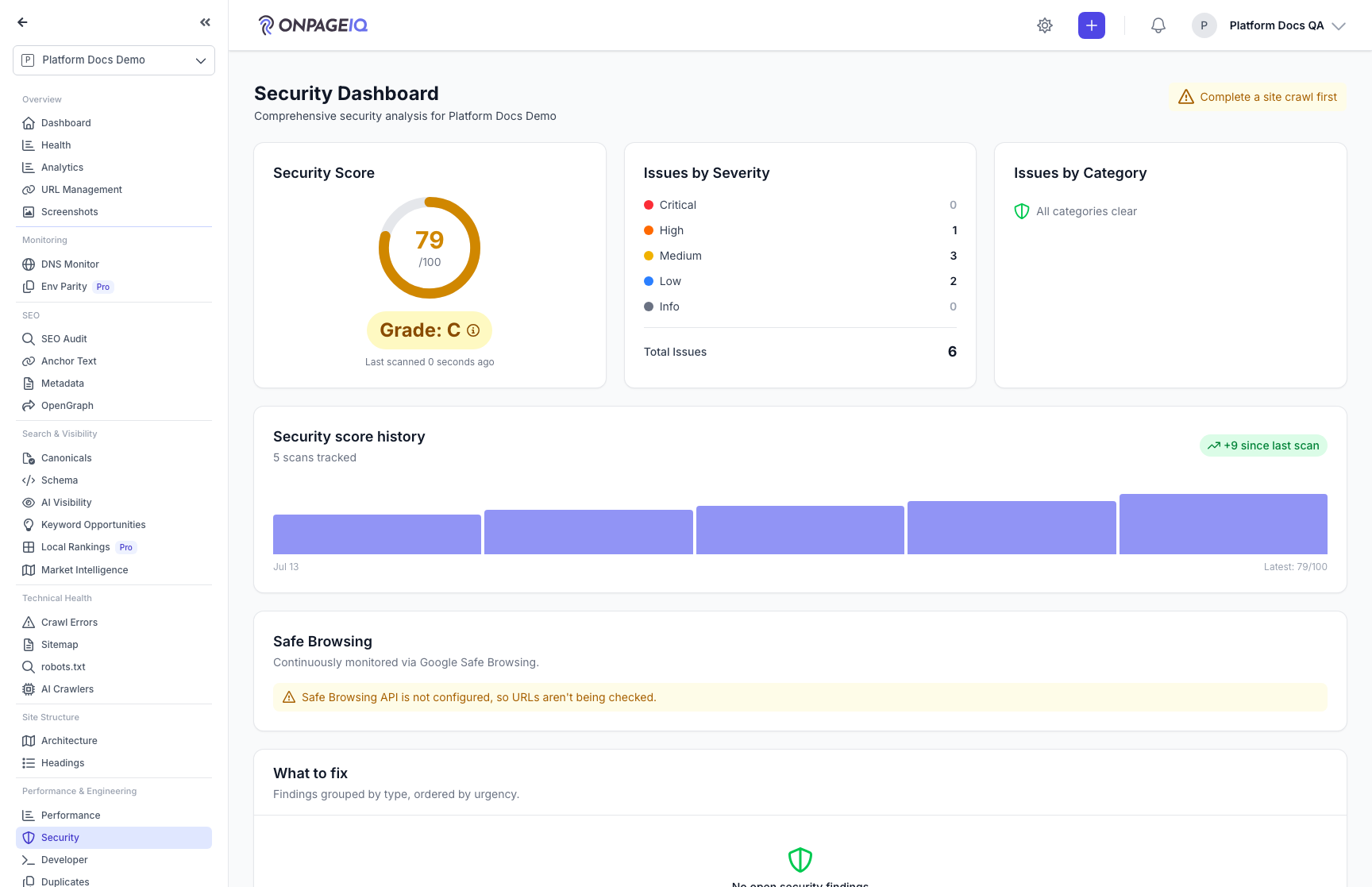
Step 1. Read the score history
With the addon active the project Security page gains a trend of recent audit scores, so you can see whether posture is improving or drifting rather than reading a single number.
What to do: Project → Security, with at least two completed audits.
Where: projects.security
Expected (pass)
- The trend plots one point per completed audit
- The current score and grade agree with the latest audit
Negative cases (must fail safely)
- Only one audit so far → the panel explains it needs more history rather than plotting a bare point
-
Step 2. Receive a regression alert
When a completed audit drops far enough below the previous snapshot — or the letter grade gets worse — owners and admins get an in-app notification and an email. It fires once for that audit, on the downward transition only.
What to do: Let a re-audit complete with a materially lower score, then check notifications and email.
Where: notifications.index
Expected (pass)
- Owners and admins are notified in-app and by email
- The alert names the previous and new score/grade
- A second audit at the same low score does not re-alert
Negative cases (must fail safely)
- Score drop smaller than the configured threshold and grade unchanged → no alert
-
Step 3. Let scheduled re-audits run
A daily command re-audits each eligible project once its last completed scan is older than the org's tier cadence — so monitoring continues without anyone remembering to press the button.
What to do: Ensure the scheduler runs; confirm projects are re-audited at their tier cadence.
Where: security-monitoring:run-scheduled (scheduled command)
Expected (pass)
- A project is re-audited only once it is older than its org's interval
- A fresh project is not re-scanned early
Negative cases (must fail safely)
- Org loses the addon → scheduled re-audits stop; existing history remains readable per retention
-
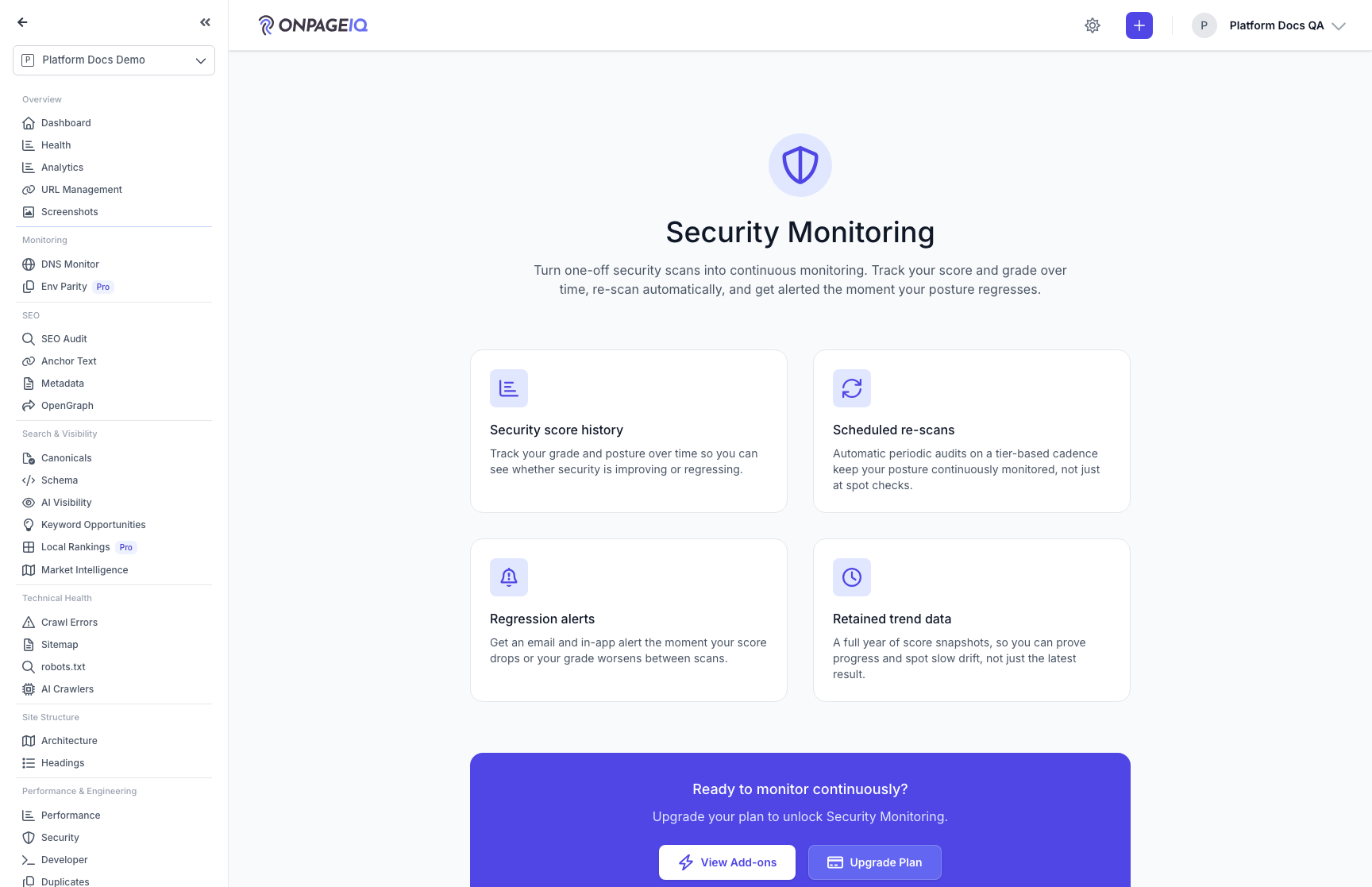
Step 4. Check the gated state
An org without the addon keeps the full one-shot Security audit; only the continuous-monitoring surface is gated, and it points at the upsell rather than failing.
What to do: On an org without the addon, open Security and follow the score-history link.
Where: security-monitoring.upgrade
Expected (pass)
- The Security page still renders its audit
- The score-history panel links to the upgrade page, not a 403
Negative cases (must fail safely)
- Direct URL to the upgrade page without the addon → still renders (it is deliberately ungated)
Related guides
Security Dashboard
One page for the security of a site: a graded score, a prioritised "what to fix" list, and continuous Google Safe Browsing monitoring.
Scheduled Scans
Recurring scan schedules with credit reservation and refund on skip.
Notifications
In-app notification inbox for scans, assignments, billing, and monitor alerts.
Billing & Subscriptions
Manage subscription tier, purchase credits, add-ons, and view billing history.
Preflight
Launch-readiness board: what still blocks putting this site into production, reported as two numbers that are never averaged.