File Parity
Compare the same artifact (PDF/HTML/JSON/CSV) across your dev, staging, UAT, and production environments, and surface drift with evidence.
User goal
Catch the file that silently differs between staging and production before a customer does.
- Tier
- Stripe add-on or per-org grant — no plan includes it by tier
- Nav label
- Env Parity
- Route
- /projects/{project}/file-parity
- Gates
- file-parity-addon file-parity-addon
Prerequisites
- file-parity-addon active for the org (Stripe price or per-org grant — the tier map does not include it)
- At least two environments defined on the project (Settings → Environments)
- At least one artifact configured, reachable from each environment
QA focus
- Every route sits behind EnsureAddonAvailable(file-parity-addon) AND each Livewire mount() re-checks project↔org (defense in depth)
- Evidence is served only by the authorized ParityEvidenceController — never Storage::url()/temporaryUrl()
- {runId}/{rowId} are raw ids resolved run-scoped server-side; {kind} is a fixed allowlist, so an unknown value 404s before the controller
- Per-tier caps on environments, artifacts, and runs/day (config/file-parity-addon.php → limits)
Overview
File Parity compares the same artifact (PDF, HTML, JSON, or CSV) across your project environments — for example dev, staging, UAT, and production — and surfaces drift with downloadable evidence.
What you get
- User-defined environments and configured artifacts under Env Parity
- All-pairs comparison with format-aware comparators
- Tolerant mode (preset ignore rules for noise like CSRF tokens and timestamps) or strict mode
- Acknowledge expected differences so intentional drift stops alerting without hiding new mismatches
- Manual, scheduled, webhook, and scan-completion triggers
- Normalized inputs and diffs as authorized, downloadable evidence
How it works
- Define environments and artifacts, then Run Now (or automate via schedule/webhook/scan)
- Watch live progress; each pair resolves to match, content/metadata mismatch, expected, or fetch error
- Open a mismatch for the diff pane; mark expected differences with an expiry when appropriate
Common issues & false alarms
- Artifact unreachable from one environment → that fetch records an error and the pair reports error_fetch_or_generate rather than a false "match"
- Artifact larger than the fetch cap (config → fetch.max_kb) → fetch fails; raise the cap or point at a smaller artifact
- A run stuck in Pending/Running blocks the per-project overlap guard; `file-parity:sweep-stale-runs` reaps orphans
Interactive guide
Step of
What to do
Where to find it
Expected (pass)
Negative cases
Tips
Screenshot pending capture
All steps (reference)
-
Step 1. Define your environments
Environments are user-defined per project — name them to match how you actually ship (dev / staging / uat / prod). Reading the tab is Member+; creating and editing environments is Owner/Admin.
What to do: Project → Settings → Environments → add each environment with its base URL and any credentials.
Where: projects.settings (Environments tab)
Expected (pass)
- Each environment saves with its base URL
- Members can read the tab; only Owner/Admin can write
- Adding beyond the tier cap is blocked with the applied limit named
Negative cases (must fail safely)
- Non-member of the project org → the tab is hidden entirely, and a direct URL is refused
-
Step 2. Configure the artifacts to compare
An artifact is one file to compare across every environment — a PDF export, a rendered HTML page, a JSON or CSV endpoint. Give it a path that resolves against each environment's base URL. You can seed artifacts from URLs already scanned on the project instead of typing them.
What to do: Env Parity → Artifacts → add an artifact, pick its type, choose tolerant or strict compare.
Where: file-parity.artifacts
Expected (pass)
- Type drives which comparator runs (PDF / HTML / JSON / CSV)
- Tolerant mode applies the preset ignore rules; strict mode ignores them
- Artifact count is capped per tier
Negative cases (must fail safely)
- Over the tier artifact cap → creation blocked with the applied cap shown
-
Step 3. Run a comparison and watch it progress
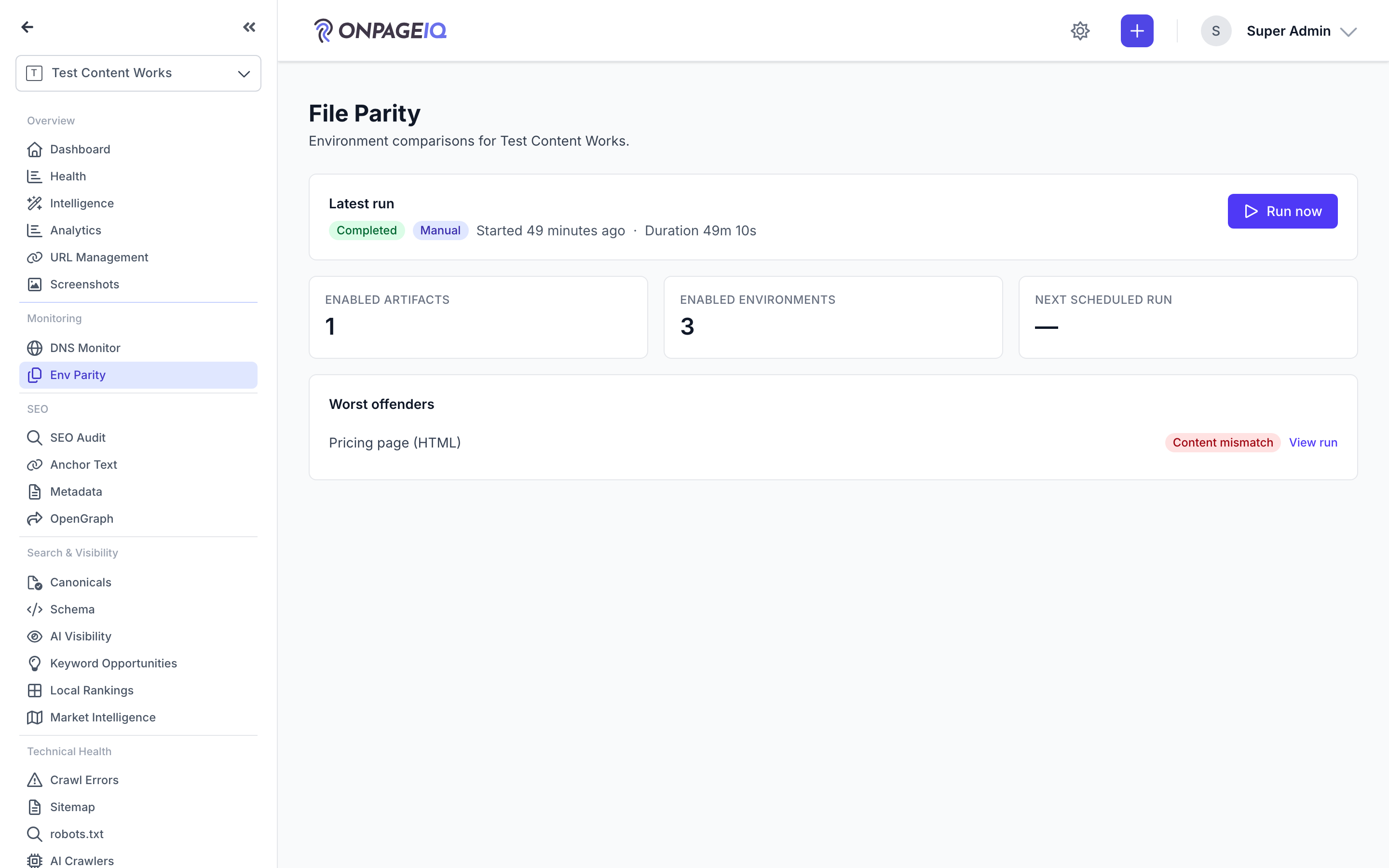
Run Now fetches the artifact from every environment, then compares all pairs. The dashboard shows the run's live progress and each pair's outcome: match, content mismatch, metadata-only mismatch, expected, or a fetch/generate error.
What to do: Env Parity → Run Now, then watch the dashboard.
Where: file-parity.index
Expected (pass)
- Progress updates live while the run executes
- Each pair resolves to one of the five comparison statuses
- A failed fetch is reported as an error, never as a match
Negative cases (must fail safely)
- Over the manual runs/day cap → Run Now is blocked with the applied cap named
- A run already in flight for the project → the overlap guard refuses a second
-
Step 4. Read the diff and its evidence
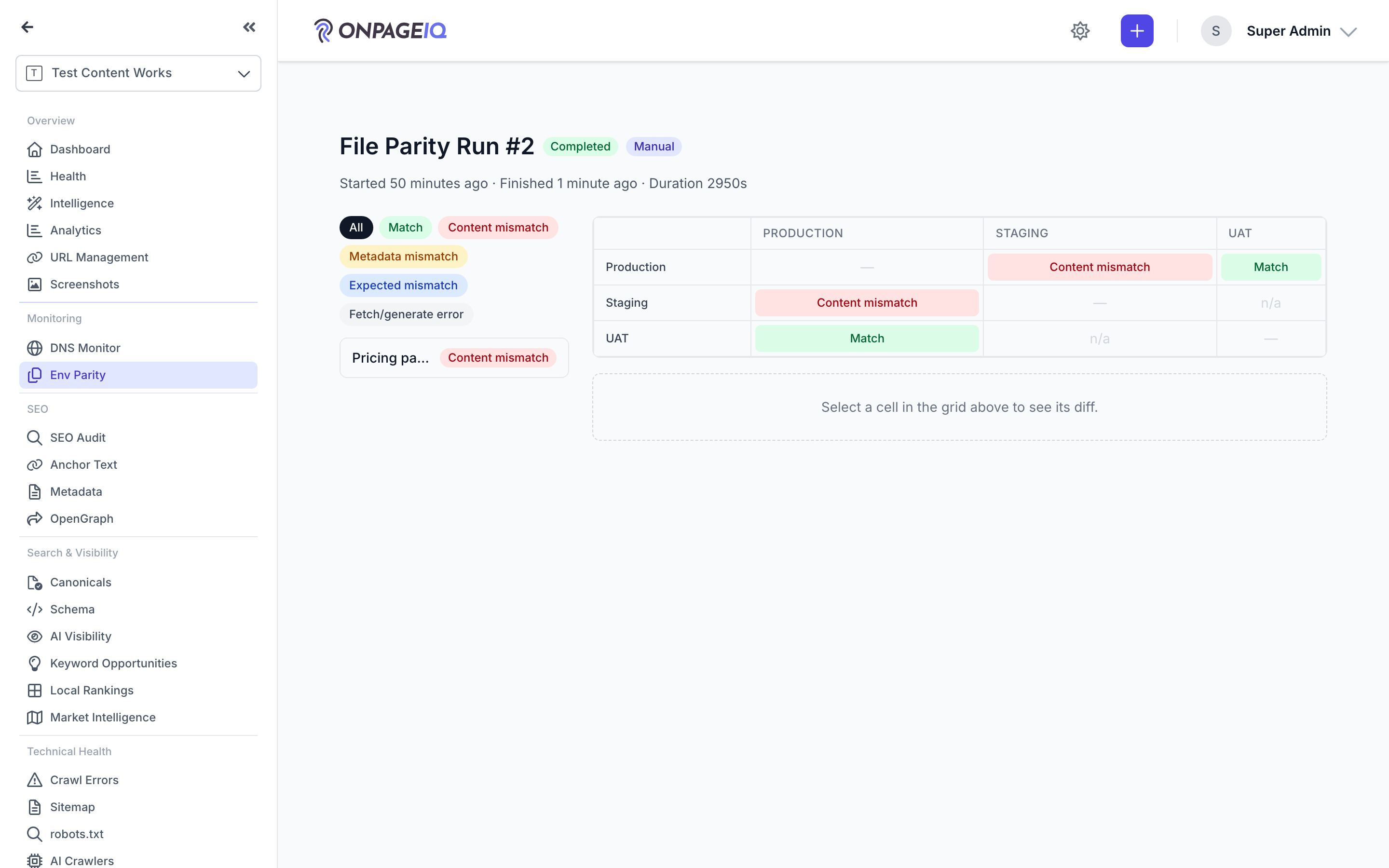
Open a mismatch to see the diff pane: the normalized inputs side by side with the differing regions marked. The normalized form, the diff, and the fetch metadata are each downloadable, so you can prove what actually differed rather than describing it.
What to do: Open a run → pick a mismatched comparison → read the diff pane, download evidence if needed.
Where: file-parity.runs.show
Expected (pass)
- Diff highlights only the regions that survived the ignore rules
- Evidence downloads come from the authorized controller (not a public storage URL)
- Metadata-only differences are labelled as such, not as content drift
Negative cases (must fail safely)
- A run id from another project → 404, not a readable run
- Hammering evidence downloads → throttled by the file-parity-evidence limiter
-
Step 5. Acknowledge a difference you expect
Some drift is intentional — a staging banner, an environment-specific hostname. Acknowledge it and that comparison reports as "expected" instead of a mismatch, until the acknowledgment expires. Genuine new drift still surfaces.
What to do: On a mismatched comparison → Mark expected → set how long it should stay acknowledged.
Where: file-parity.runs.show
Expected (pass)
- The comparison reports mismatch_expected rather than mismatch_content
- A different change on the same artifact still reports as a mismatch
Negative cases (must fail safely)
- Acknowledgment expired → the difference reports as a mismatch again
-
Step 6. Automate it
Beyond Run Now, a parity run can start on a schedule, from your own deploy pipeline via the webhook, or automatically when a scan completes. The webhook token is per project and rotatable from Settings.
What to do: Settings → Environments → webhook token, then POST /api/parity/{project}/trigger from your pipeline.
Where: projects.settings (Environments tab) → webhook token
Expected (pass)
- A valid token starts a run and records its trigger as webhook
- Scheduled runs respect the per-tier scheduled-runs/day cap
- Rotating the token immediately invalidates the previous one
Negative cases (must fail safely)
- Missing or wrong token → rejected without starting a run
- Token from another project → rejected
Related guides
Projects & URLs
Manage projects, URL inventory, tags, and page-level detail.
Billing & Subscriptions
Manage subscription tier, purchase credits, add-ons, and view billing history.
Scheduled Scans
Recurring scan schedules with credit reservation and refund on skip.
API Tokens & Webhooks
Create Sanctum API tokens and configure outbound webhook endpoints for integrations.