Local Listings
New · Jul 29, 2026 Needs testingMatch BBB, Yelp, Angi, Trustpilot, and G2 listings to a project (Google Business Profile sync planned), confirm the right business, and surface reputation proofs in Business Profile, Local SEO, and Intelligence.
Still to be tested
This guide and the Local Listings feature shipped recently and still need QA walkthrough sign-off.
Use the QA focus checklist below; remove the needs_testing flag in
config/platform-docs/pages/addons.php after the team signs off.
User goal
Link the correct directory profiles to a project and keep ratings, reviews, and accreditation visible where the team already works.
- Tier
- Pro and up
- Nav label
- Local listings
- Route
- /projects/{project}/local-listings
- Gates
- directory-listings-addon directory-listings-addon
Prerequisites
- directory-listings-addon active for the org (Pro and up)
- A project with useful business signals (Business Profile, Local SEO, or confirmed Alignment NAP — name plus phone, website, or city)
- Credits available if the month's included unlocks are already spent
- Horizon worker watching the directory-listings queue (for live directory scrapes)
QA focus
- Project-scoped links are org+project isolated; confirm/unlink never accept organization_id from the client
- Monthly unlock allowance is per tier (config → tier_limits.monthly_unlocks; Free 0 / Pro 10 / Team 50 / Enterprise unlimited); overage draws credits
- Incomplete directory payloads soft-fail: raw is kept, unlock is refunded, project is not linked
- Multi-location BBB profiles never auto-confirm at 100% — human confirm is required
- Phase-2 BBB reviews/complaints collectors only run when BRIGHTDATA_BBB_REVIEWS_COLLECTOR_ID / COMPLAINTS ids are set
- Yelp reviews auto-enqueue after overview unlock when BRIGHTDATA_YELP_REVIEWS_DATASET_ID is set
- Closed Yelp businesses can still unlock; Local listings shows a Closed on Yelp badge
- Find + Manual URL live in the Find listings slide-over; multi-select Find and Manual URL Confirm disable / note not-configured when BrightData for that provider is missing
- Confirming a match keeps the selected URL visible under Linked (Confirming…) until enrichment finishes (Reverb + slow poll); rediscovery does not wipe that pick
- Business Profile becoming ready auto-schedules discovery for every configured provider the project has not linked yet (not BBB-only)
- Find resolves blank signals from Local SEO then confirmed Alignment NAP when Business Profile fields are empty
- When a website domain is known, SERP queries are domain-first (site: + domain); NAP matching happens after confirm/enrichment
- A pending/running request older than stuck_after_minutes (30) no longer blocks the provider — hasInFlightEnrichment() is age-bounded, so Find/Confirm work again and the banner offers Try again
- directory-listings:reap-stuck-requests settles requests past reap_after_minutes (120) via failAndRefund — idempotent refund, one audit row per recovery, and the reap deadline is clamped never to precede the UI one
- Retry re-submits the original requested URL with the item's confidence and match evidence; it is rejected with a message (not an exception) when a live request already holds the provider slot
- Candidate geo evidence comes from the listing, never from the project’s own signals — a SERP-sourced candidate must not report the project’s city/state as its own, and must not earn the geo confidence bonus it cannot prove
Overview
Local Listings matches directory profiles (BBB, Yelp, Angi, Trustpilot, and G2) to a project so ratings, reviews, and accreditation show up where the team already works. Google Business Profile sync is planned; today Google Places ratings from Local SEO may appear beside directory links.
When Pennant listing-alignment is on for the org, Local listings also shows an Alignment tab (see the Listing Alignment guide). Confirm the canonical NAP on Project Settings → Local SEO, raise source coverage (crawl, Places confirm, GBP/Listings links), then run Core/Full audits — findings and tasks appear after each run.
What you get
- Local listings under Business in the project sidenav
- Find listings slide-over: multi-select directories and Manual URL (Find is free; Confirm spends a monthly unlock or credits)
- Find suggestions from Business Profile, Local SEO, and confirmed Alignment NAP (Business Profile wins when present), or paste a provider URL
- Domain-first SERP when a website is known (
site:… "{domain}"); otherwise name + city + state — finer NAP matching after you confirm a listing URL - Suggested matches panel after Find; selected confirm stays visible as Confirming… until enrichment finishes (live update via Reverb)
- Auto-discovery for every configured provider when a Business Profile becomes ready (and again when NAP signals change)
- Confirmed links (primary or aggregate) with org-shared cache unlocks
- Reputation embeds on Business Profile, Local SEO, and Intelligence → External proofs
- Unlink, report bad, and refresh for linked rows (refresh always charges credits)
- Optional Alignment tab for Listing Alignment (separate Pennant flag)
How it works
- Open Find listings to search directories and/or paste a Manual URL, then confirm; multi-location BBB (and Angi/Trustpilot/G2) always need human confirm
- After Confirm, Linked shows Confirming… until enrichment finishes — the page updates live (no manual refresh)
- A successful scrape unlocks and links; thin/unusable scrapes soft-fail as Incomplete or Failed with the unlock refunded and no project link — the pick stays available to retry
- A lookup that stops responding recovers on its own: the provider is released after 30 minutes (banner turns to a failure with Try again), and the request is closed out with the unlock refunded after 120 minutes — both windows are defaults and configurable
- Stale profiles show a badge; manage and refresh stay on Local listings
- Monthly unlock allowance is per tier; overage draws credits
Common issues & false alarms
- No candidates → fill Business Profile or Local SEO (name plus phone, website, or city), then Find listings again — with a website, SERP targets that domain on the directory site first
- Find says add a business name… but Local SEO is filled → Save Local SEO / confirm Alignment NAP, refresh the page, then Find again
- Request stuck Pending/Running → it now recovers itself: after 30 minutes without progress the provider is released and Try again appears on the banner; after 120 minutes the request is closed out (both windows are configurable defaults) and any reserved unlock is refunded (directory-listings:reap-stuck-requests, every 5 min). If it never recovers, the scheduler is not running. Horizon must still process the directory-listings queue for new requests (restart supervisor after deploy), and if Linked never leaves Confirming…, check Reverb/WebSockets on the environment
- Incomplete or Failed after confirm → the directory scrape returned a thin or unusable profile; unlock credits are refunded and nothing is linked—retry later, try another URL, or contact support if it keeps happening
- Find selected disabled → add discovery signals (name + phone/website/city); Manual URL in the same panel still works
- Find / Confirm URL disabled with a not-configured alert → BrightData token, SERP zone, or that provider’s collector/dataset id is missing in this environment (admin)
- Empty Find with no obvious reason → SuperAdmin: Filament → Intelligence → Discovery Runs (signals, SERP query, organic/filtered samples)
- A suggested match looks like the wrong town → check the match evidence rather than the score alone. Search results carry no reliable location for the listing, so location is reported only when it can actually be established; a candidate found purely by name will not claim one
- Reviews/Complaints show Not configured → set Bright Data phase-2 BBB collector ids in env (admin)
Interactive guide
Step of
What to do
Where to find it
Expected (pass)
Negative cases
Tips
Screenshot pending capture
All steps (reference)
-
Step 1. Open Local listings
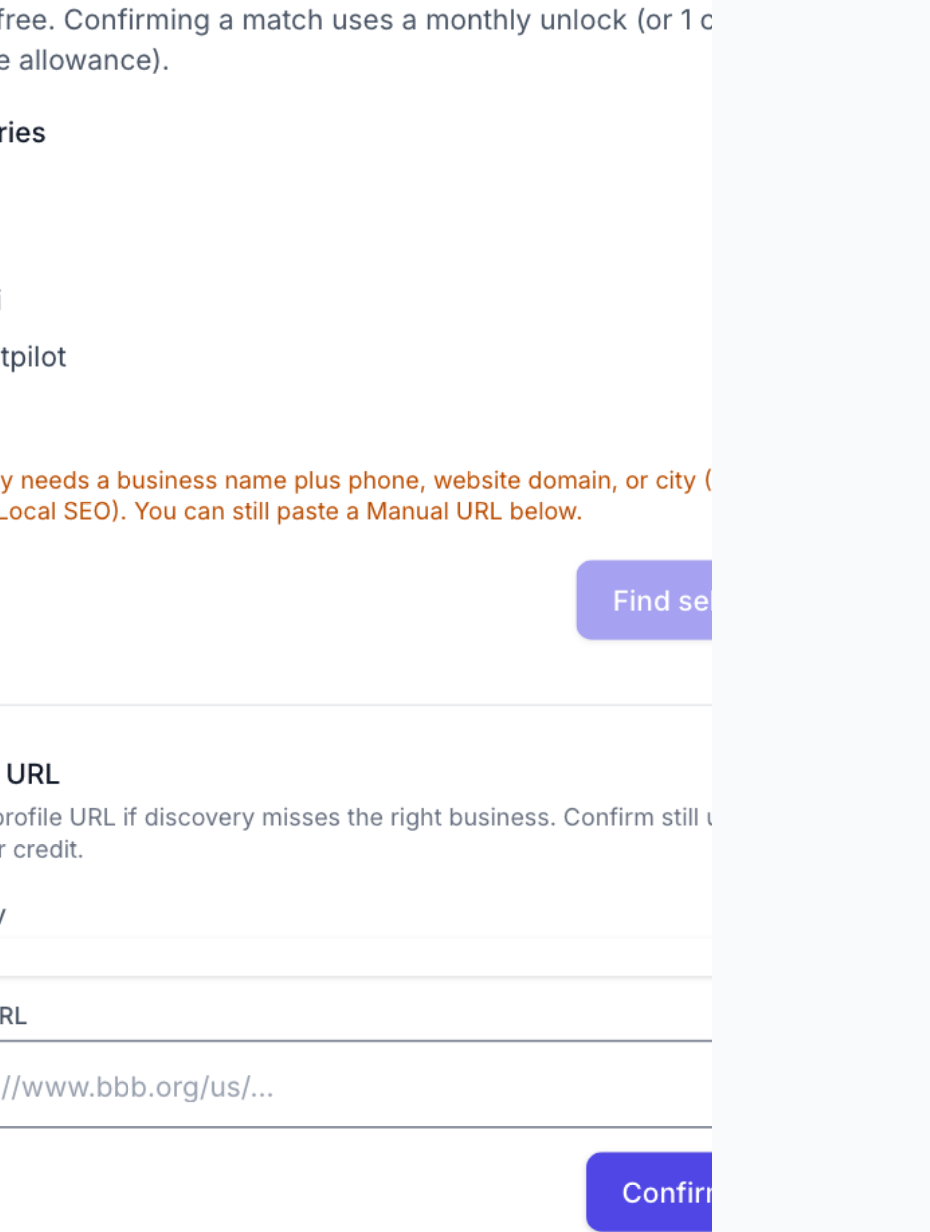
From a project, open Business → Local listings. Orgs without the addon see the upgrade page instead of a bare 403. Click **Find listings** to open the slide-over: multi-select directories for Find selected, and Manual URL (directory + paste + Confirm URL) in the same panel. Providers that are not wired show as not configured (disabled).
What to do: Project sidenav → Business → Local listings → Find listings
Where: directory-listings.index
Expected (pass)
- Page title Local listings with a single Find listings action
- Find listings slide-over shows directory checkboxes and Manual URL
- Not-configured note when a provider lacks BrightData setup
Negative cases (must fail safely)
- Addon off → upgrade page (directory-listings.upgrade)
- Cross-org project id → 403/404
-
Step 2. Discover and confirm a BBB match
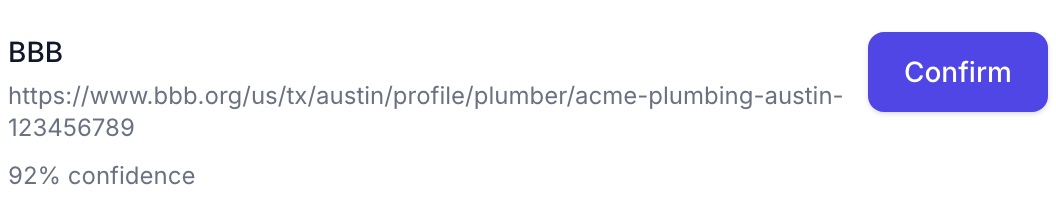
In Find listings, select BBB (and peers if you want), then Find selected. Candidates come from Business Profile, then Local SEO / Alignment NAP for blanks (cache-first, then SERP). When a website domain is known, SERP is domain-first on bbb.org; otherwise name + city + state. Confirm a suggestion, or use Manual URL in the same panel with a https://www.bbb.org/… link. After Confirm, the URL stays under Linked as Confirming… until enrichment finishes (the page updates live). Multi-location businesses always need human confirm. Find is free; Confirm uses a monthly unlock or credits.
What to do: Find listings → select BBB → Find selected → Confirm (or Manual URL → Confirm URL)
Where: directory-listings.index
Expected (pass)
- Suggested matches panel with confidence scores
- Confirm keeps the selected URL visible as Confirming… while enrichment runs
- On success a linked listing appears with provider, role, and match %
- On Incomplete / Failed, no project link is created and the unlock is refunded; the pick can be retried
Negative cases (must fail safely)
- Non-BBB URL → validation error
- Allowance spent and no credits → blocked with a top-up-style message
- Thin BBB payload → Incomplete / Failed with refund (retry later or try another URL)
- BBB not configured → disabled in Find slide-over / Confirm URL not-configured alert
Tips
- Cache hits for a complete, fresh profile link immediately without a new scrape when the org already unlocked that external id.
- If Incomplete keeps happening on good BBB URLs, tell an admin — the scrape source may be returning less data than expected.
-
Step 3. Discover and confirm other directories
In Find listings, select Yelp / Angi / Trustpilot / G2, or use Manual URL in the same panel. Discovery uses the same signal resolver as BBB (Business Profile → Local SEO → Alignment NAP) and domain-first SERP when a website is known. Confirm keeps the selected listing visible until enrichment finishes — it does not disappear from the page. Yelp overview unlock can auto-enqueue reviews when the Yelp reviews dataset is set. Closed Yelp businesses still unlock and show a Closed on Yelp badge. Angi, Trustpilot, and G2 never auto-confirm at 100%.
What to do: Find listings → select providers → Confirm, or Manual URL → Confirm URL
Where: directory-listings.index

Expected (pass)
- Candidates appear with confidence scores when Find runs successfully
- Successful unlock creates a primary link for that provider
- Yelp reviews artifact status updates when the reviews dataset is configured
- Manual URL lives in the Find listings slide-over (not separate page sections)
Negative cases (must fail safely)
- Wrong host / path for that provider → validation error
- Provider unset → disabled in Find slide-over with not-configured note
- Incomplete scrape → Failed with unlock refunded
-
Step 4. Recover a lookup that stopped responding
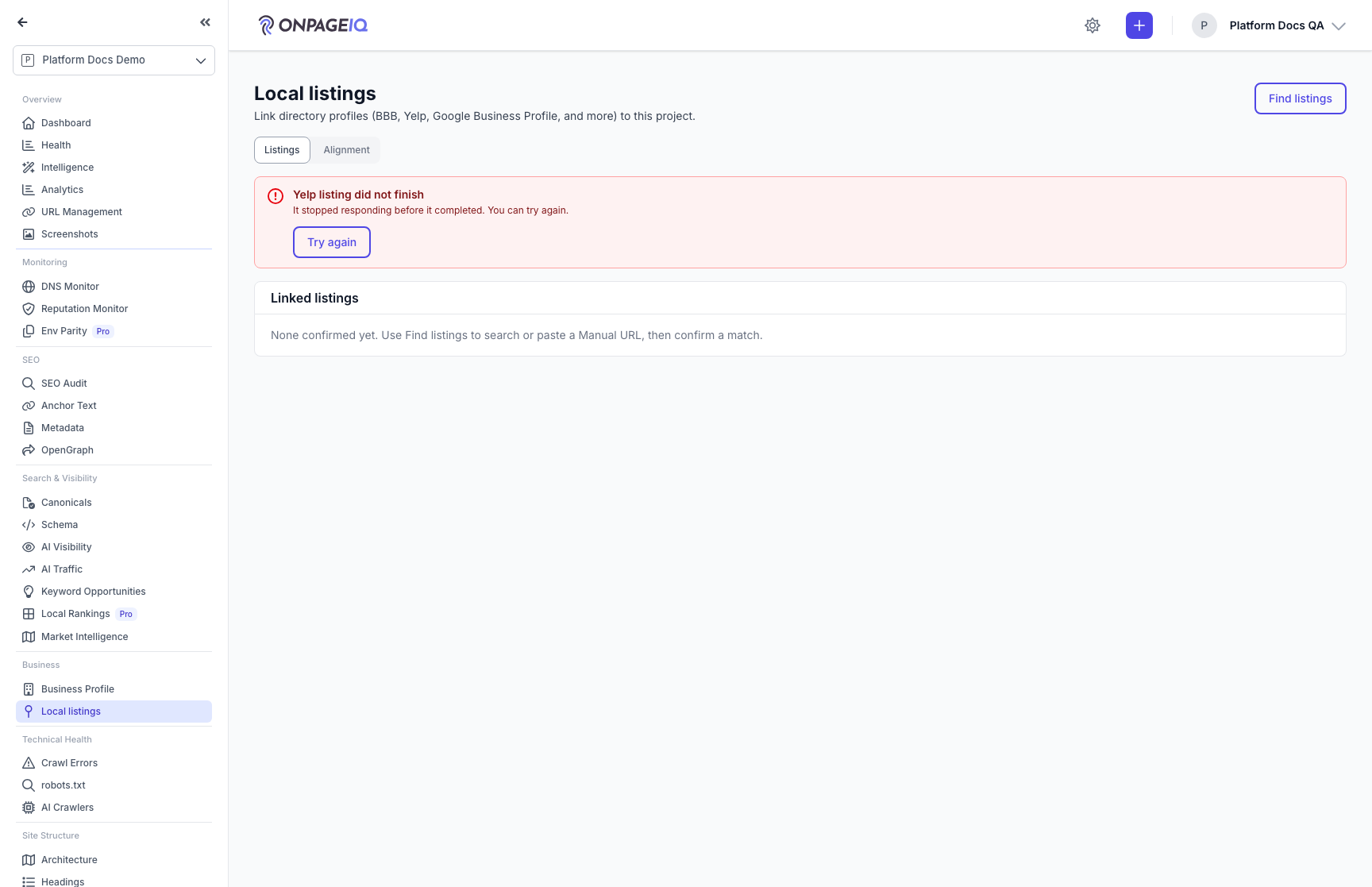
A confirm starts a background lookup with the directory. If it stops making progress, you no longer have to wait it out or ask an admin. After 30 minutes by default (configurable) the provider is released and the banner turns red with **Try again** — retrying re-uses the listing you originally picked and the confidence it earned, so you do not re-enter the URL. After 120 minutes the request itself is closed out and any reserved unlock is refunded. The longer second window is deliberate: a lookup can simply be queued behind other work, and closing it early would discard a directory result the account already paid for.
What to do: Local listings → banner reads "… listing did not finish" → Try again
Where: directory-listings.index
Expected (pass)
- Stalled lookup renders as a failure (red), never as a green success
- Try again is offered as soon as the lookup stalls — before the automatic clean-up runs
- Retry re-submits the original URL; a new lookup starts and the banner returns to in-progress
- Reserved unlock credits are returned when the request is closed out
Negative cases (must fail safely)
- A genuinely in-progress lookup → no Try again, banner stays in-progress with live updates
- Provider since unconfigured → Try again hidden (nothing to retry into)
- A live request already holds the provider → retry reports it instead of starting a second lookup
Tips
- Recoveries are counted in the hourly operational diagnostics digest, so repeated stalls surface to the team without anyone reporting them.
- Both windows are configurable: DIRECTORY_LISTINGS_STUCK_AFTER_MINUTES and DIRECTORY_LISTINGS_REAP_AFTER_MINUTES. The reaper never fires before the UI releases the provider.
-
Step 5. Read reputation embeds
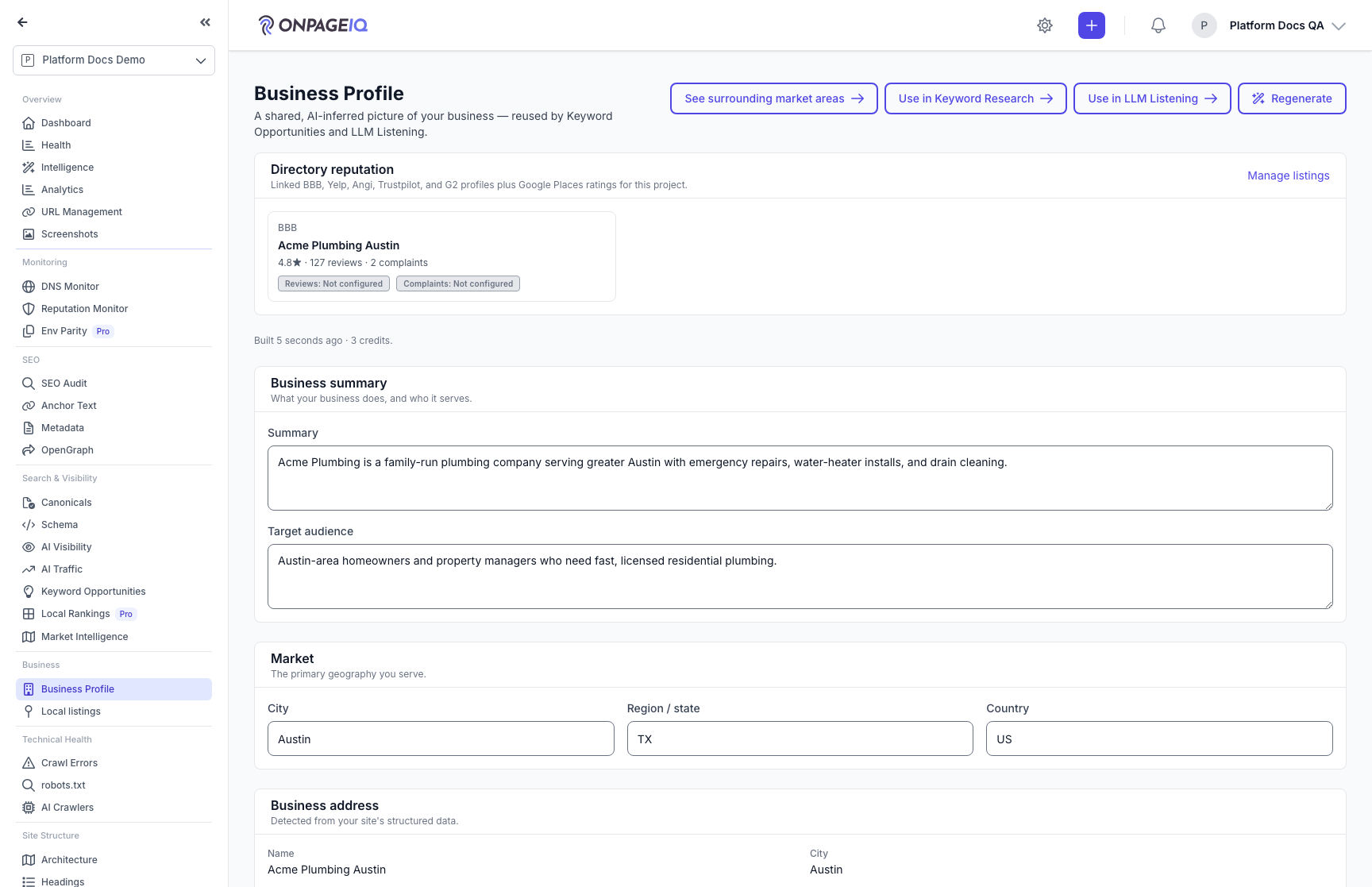
Primary linked listings surface as read-only strips: Business Profile → Directory reputation; Project Settings → Local SEO → Linked directory listings; Project Intelligence → Overview → External proofs. Manage/refresh stays on Local listings.
What to do: Open Business Profile (ready), Local SEO tab, and Intelligence Overview after linking
Where: projects.settings.business-profile
Expected (pass)
- Provider rating / review / complaint counts render when present
- Stale badges appear when profile or artifact TTLs are exceeded
- Manage listings links back to Local listings
Negative cases (must fail safely)
- Addon off → embeds hidden
- No primary link → External proofs section omitted
-
Step 6. Unlink, report bad, or refresh
Unlink removes the project link and remembers a reject so discovery will not re-suggest that listing. Report bad also flags the shared cache row for ops. Refresh profile re-scrapes a stale linked profile and always charges the refresh credit cost. If a refresh comes back incomplete, an already-complete shared profile is left unchanged and the failed refresh is refunded.
What to do: On a linked row: Unlink, Report bad, or Refresh profile
Where: directory-listings.index

Expected (pass)
- Unlink removes the row and flashes confirmation
- Report bad sets reported_bad on the directory profile (visible in Filament)
- Refresh queues a new enrichment request when the profile is stale
Negative cases (must fail safely)
- Refresh without credits → blocked
- Foreign link id → 404
- Refresh already in progress → blocked until the current request finishes
-
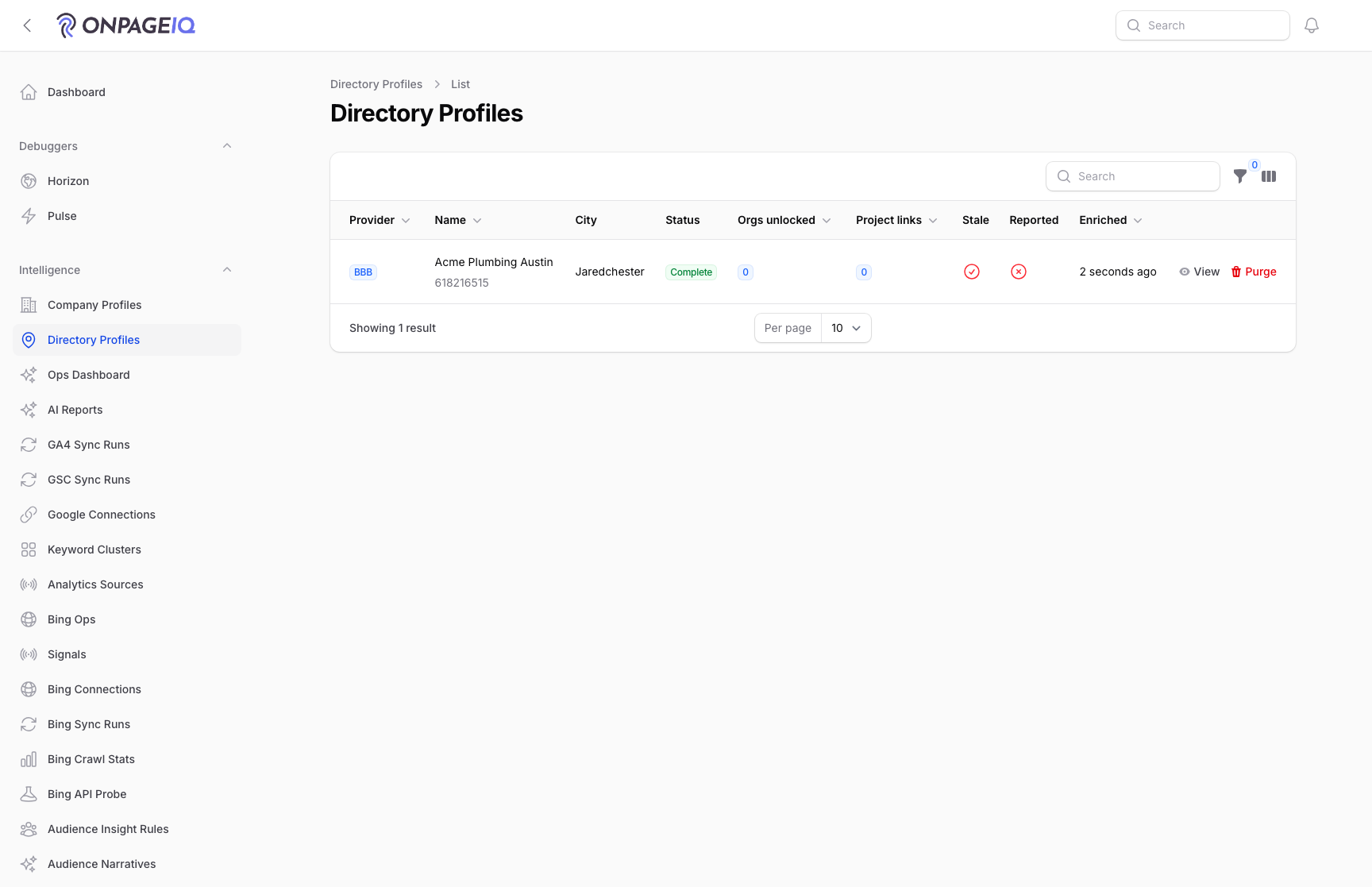
Step 7. Admin: enable addon and inspect Directory Profiles
SuperAdmins enable Local Listings per org in Filament. Shared cache rows (raw JSON, artifacts, org unlocks, project links) live under Filament → Intelligence → Directory Profiles. After empty Find results, open Filament → Intelligence → Discovery Runs for the SERP query, resolved signals, and organic/filtered samples (Yelp today). Scrapes need Horizon on directory-listings (and company-enrichment for Company Intelligence).
What to do: Filament → Organizations → Add-ons → enable Local Listings. Then Filament → Intelligence → Directory Profiles (or Discovery Runs).
Expected (pass)
- Pennant override activates directory-listings-addon for that org
- Tenant sidenav shows Business → Local listings
- Directory Profiles lists scraped rows after a successful confirm
- Discovery Runs shows a yelp row after Find with signals and SERP diagnostics
Negative cases (must fail safely)
- Toggle off → tenant hits upgrade page
- Jobs stuck → ensure Horizon supervisor-directory-listings is running; restart after deploy
Tips
- Requires BRIGHTDATA_API_TOKEN, BRIGHTDATA_SERP_ZONE, BRIGHTDATA_BBB_COLLECTOR_ID, and ProductionDataSeeder pricing rows for brightdata/dca (and brightdata/dataset for Dataset API providers) under DirectoryListings.
- BrightData SERP must send a Google search URL (zone + url + format/data_format) — bare `query` bodies fail validation.
- Optional phase-2 BBB: BRIGHTDATA_BBB_REVIEWS_COLLECTOR_ID and BRIGHTDATA_BBB_COMPLAINTS_COLLECTOR_ID.
- BBB collector code-mode ↔ API parity: ops runbook in `.claude/tasks/directory-listings-and-company-intelligence-ops.md` §19. Live API still diverges from code-mode while Bright Data support investigates — do not treat matching as production-ready until that checklist passes.
- Yelp: BRIGHTDATA_YELP_OVERVIEW_DATASET_ID (default gd_lgugwl0519h1p14rwk); optional BRIGHTDATA_YELP_REVIEWS_DATASET_ID=gd_lgzhlu9323u3k24jkv.
- Angi: BRIGHTDATA_ANGI_PROFILE_COLLECTOR_ID. Trustpilot: BRIGHTDATA_TRUSTPILOT_REVIEWS_DATASET_ID. G2: BRIGHTDATA_G2_OVERVIEW_DATASET_ID.
- Scheduled artifact refresh is kill-switched by DIRECTORY_LISTINGS_SCHEDULED_REFRESH (default false).
Related guides
AI Business Profile & Keyword Assist
Let AI infer your market, audience, competitors, and priority keywords from your crawl — then reuse it in Keyword Research and AI Visibility (LLM Listening).
Intelligence Hub
Cross-source insights combining GSC, GA4, scans, and audits.
Company Intelligence
Look up firmographic detail for a list of company domains and keep it in a shared, org-level library.
Local Rankings (GeoGrid)
Track Google local-pack rankings across a geographic grid, with a square or radial (concentric-ring) layout, a rank heatmap, and PDF reports.
Listing Alignment
Confirm a location’s business identity on Project Settings → Local SEO, then audit name/address/phone/website alignment across website, schema, Google, directories, and Apple/Azure — with honest Not tested when a source is unavailable, plus findings and tasks when sources disagree.
Billing & Subscriptions
Manage subscription tier, purchase credits, add-ons, and view billing history.